On-stage control
Work with live-ready processing, anti-feedback, and quick presets so you are ready for rehearsals and shows fast.
Mix & Master Beatbox Console
BEATBOX PRO V3 is out today (3 June 2026) on Mac and Windows. Pi VST3 V3 is live on Linux; Ubuntu x64 standalone is live. Deeper mix and master than V2. Beatbox Pro Live for the stage is on this site — Stripe checkout is live. Mac App Store coming soon. Version 2 is legacy.
Version 3 is out today (3 June 2026) — deeper mix & master for recorded beatbox. Mac, Windows, and Linux V3 (Ubuntu + Pi) downloads are live. Mac App Store coming soon. Beatbox Pro Live for live stage is listed below — downloads unlock after Stripe checkout. Version 2 is legacy.
BEATBOX PRO
Built for tight control over your live sound and studio sound in one workflow.
The standalone app is included with Windows and Mac. On Linux you get a separate standard x64 standalone for most PCs, plus a Raspberry Pi standalone (its own build).
Audio demo
Play this quick demo to hear how the plugin shapes punch, clarity, and live-ready tone.
Why BEATBOX PRO
Work with live-ready processing, anti-feedback, and quick presets so you are ready for rehearsals and shows fast.
Use the same sound engine for recording, sound design, and practice sessions when you want to build your tone.
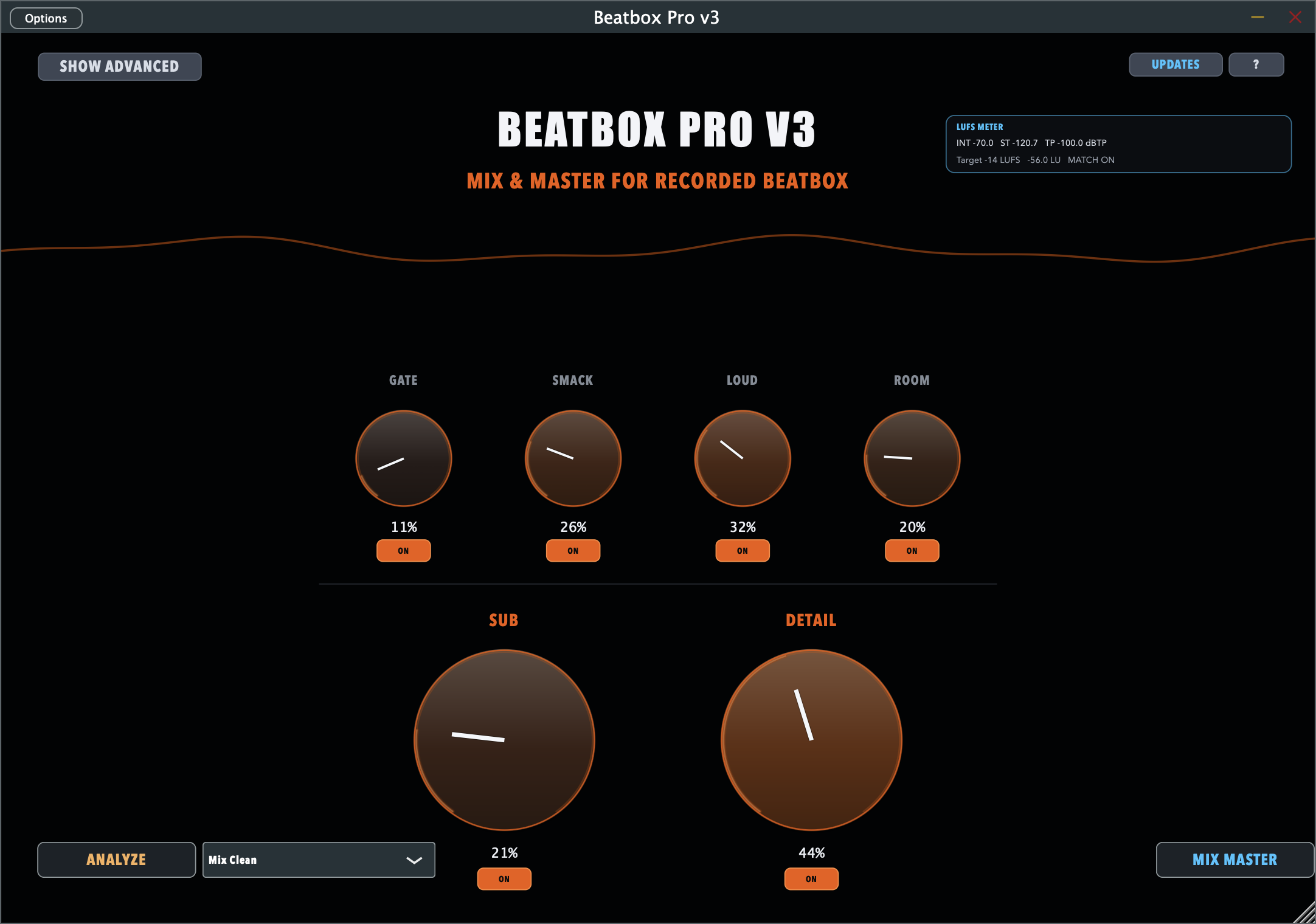
Gate, smack, punch, loud, width, air, and flavour in one clear interface with no messy chains or complex routing.
Built for fast results
BEATBOX PRO is tuned for very low latency so you can perform and record with a direct feel on PC and live setups.
Designed for responsive monitoring and punchy control, so your beatbox dynamics stay tight while recording or performing live.
Gate, smack, punch, loud, width, air, flavour, and more are all in one place with clear controls, so you do not need complex plugin chains.
The reverb automatically ducks when needed, keeping the direct signal clear while still giving space and vibe right away.
I originally built this plugin for myself, then realized it can help the beatbox scene get great results faster for PC recordings and live beatbox.
Questions or feedback? Send it to beatboxbart@gmail.com. Feedback is actively reviewed and helps shape future updates.
Versions
Limited intro offer until July 5: each platform is 39 euro instead of 69 euro. Mac V3 and Windows V3 are live now. Linux V3 (Ubuntu + Raspberry Pi) is live. Mac App Store coming soon. V2 is legacy. Free 7-day trial on Mac and Windows.
Bought Version 1? Request Version 3 free: email beatboxbart@gmail.com or Instagram DM to @b_artbeatbox (B-Art Beatbox) with your proof of purchase.
Mac V3 and Windows V3 replace V2 on your download pages. Version 2 stays as legacy. Buyers get free updates and bug fixes. Mac App Store coming soon.
For Mac creators
69 euro
39 euro
Available at this price until and including July 5.
For Mac: AU + VST3 in your DAW, with the macOS standalone included on the same post-checkout page.
For Windows creators
69 euro
39 euro
Available at this price until and including July 5.
For Windows: VST3 in your DAW, with the Windows standalone on the same post-checkout page. Windows V3 VST3 and standalone for mix & master. V2 is legacy.
Linux desktop & Raspberry Pi
x64 standalone · Pi standalone
69 euro
39 euro
Available at this price until and including July 5.
Ubuntu x64 standalone V3 and Pi VST3 V3 are live on your Linux download page after purchase.
Live stage
Low-latency live chain: gate, EQ, dynamics, reverb ducking, venue EQ, metronome, and anti-feedback — tuned for cupped-mic beatbox on stage. Same Pro look & feel as V3. Mac, Windows, Linux & Raspberry Pi listed below — €19 per platform via Stripe. Free 7-day trial on all platforms.
For Mac · live stage
39 euro
19 euro
Live stage intro — €19 per platform.
Universal macOS: AU + VST3 + standalone for live beatbox.
Download portal: download-live-mac/ after checkout.
For Windows · live stage
39 euro
19 euro
Live stage intro — €19 per platform.
VST3 + standalone for live routing, Discord, and DAW use.
Portal: download-live-windows/.
Linux desktop & Raspberry Pi
x64 · ARM64 Pi
39 euro
19 euro
Live stage intro — €19 per platform.
Linux x64 and Raspberry Pi (ARM64) VST3 + standalone builds.
Portal: download-live-linux/.
Overview
Best for beatboxers and producers on Windows who want to work inside their DAW.
For macOS users who want BEATBOX PRO directly inside their studio workflow.
Ubuntu x64 standalone and Pi VST3 V3 are live. Legacy V1 archives remain available.
Live beatbox on stage: cupped-mic chain, venue EQ, anti-feedback, metronome. Mac, Windows, Linux & Pi — Stripe checkout is live.
Standalone Routing
You can route your mic through the standalone app and send the processed sound to Discord, online beatbox battles, browser apps, livestreams, or calls.
Windows setup
Use a virtual audio cable so the standalone output becomes the mic signal for Discord or another app.
Mac setup
Use a virtual routing device so the standalone app can feed Discord, calls, or browser platforms with your processed sound.
Tip: the exact device names depend on the routing tool you install, but the idea is always the same: mic into BEATBOX PRO, processed output into the app you want to use.
Community review
firesky_.sw
"The plugin really makes you sound better than you actually do. It's amazing for every beatboxer to use! 🔥🙌🏻"
★★★★★
FAQ
Yes. The plugin is positioned as an all-in-one beatbox console for on-stage and off-stage use, so you can keep the same sound vision across performance and production.
After purchase, you get direct access to the download page for your version.
Yes. Windows and Mac are separate purchases; each includes the matching standalone app on the same post-checkout page. Linux (desktop + Pi) is a third option here.
Mac: V3 mix/master now (App Store coming soon). Windows: V3 on your download page; V2 is legacy. Linux: V3 mix/master; older builds as legacy archives.
Yes. Your purchase includes free updates and bug fixes for the BEATBOX PRO line on the platform you bought (Windows, Mac, or Linux / Pi), as new builds are released.
Send a short email to beatboxbart@gmail.com with your proof of purchase (receipt or order confirmation). You will receive a personal download link with the latest update for the platform you bought.
Op elke knop staat welk bestand je kopieert. Na kopiëren: groene bevestiging + vinkje op de knop. Kopieer alles = alle vier in één keer.
#include "PluginProcessor.h"
#include "PluginEditor.h"
namespace {
/** Public website: standalone download + activation. Change this if your download page has a different URL. */
static constexpr const char* kBeatboxWebsiteUrl = "https://beatboxplugin.com";
constexpr juce::int64 trialLengthMs = 7LL * 24LL * 60LL * 60LL * 1000LL;
constexpr double expiredTrialMuteEverySeconds = 7.0;
constexpr double expiredTrialMuteDurationSeconds = 0.8;
/** Trial state file: getTrialStateFile() — XML root `BeatboxTrial`, attribute `firstRunMs` (epoch ms of first run).
Set to true to ignore expiry for local testing (no mutes, UI shows active trial). Must be false in shipping builds. */
constexpr bool kDevBypassTrialExpiry = true;
inline float onePoleAlpha (double sampleRateHz, float cornerHz)
{
const float dt = 1.0f / (float) sampleRateHz;
const float rc = 1.0f / (juce::MathConstants<float>::twoPi * juce::jmax (cornerHz, 1.0f));
return dt / (rc + dt);
}
inline float timeConstantAlpha (float sampleRateHz, float timeSeconds)
{
const float dt = 1.0f / sampleRateHz;
const float t = juce::jmax (1.0e-5f, timeSeconds);
return 1.0f - std::exp (-dt / t);
}
inline float feedbackChoiceToHz (int choice)
{
static constexpr float freqs[] =
{
0.0f, 160.0f, 200.0f, 250.0f, 315.0f, 400.0f, 500.0f, 630.0f, 800.0f,
1000.0f, 1250.0f, 1600.0f, 2000.0f, 2500.0f, 3150.0f, 4000.0f, 5000.0f,
6300.0f, 8000.0f
};
return freqs[juce::jlimit (0, (int) std::size (freqs) - 1, choice)];
}
} // namespace
juce::AudioProcessorValueTreeState::ParameterLayout createParameterLayout()
{
juce::AudioProcessorValueTreeState::ParameterLayout layout;
auto p = [](const char* id, int hint) { return juce::ParameterID { id, hint }; };
const juce::NormalisableRange<float> range01 (0.0f, 1.0f);
layout.add (std::make_unique<juce::AudioParameterFloat> (p ("gate", 101), "Gate", range01, 0.05f));
layout.add (std::make_unique<juce::AudioParameterFloat> (p ("smack", 102), "Smack", range01, 0.37f));
layout.add (std::make_unique<juce::AudioParameterFloat> (p ("kickpunch", 114), "Kick Punch", range01, 0.23f));
layout.add (std::make_unique<juce::AudioParameterFloat> (p ("beast", 103), "Beast", range01, 0.24f));
layout.add (std::make_unique<juce::AudioParameterFloat> (p ("sub", 104), "Sub", range01, 0.42f));
layout.add (std::make_unique<juce::AudioParameterFloat> (p ("detail", 105), "Detail", range01, 0.54f));
layout.add (std::make_unique<juce::AudioParameterFloat> (p ("loudness", 106), "Loudness", range01, 0.28f));
layout.add (std::make_unique<juce::AudioParameterFloat> (p ("width", 107), "Width", range01, 0.20f));
layout.add (std::make_unique<juce::AudioParameterFloat> (p ("air", 108), "Air", range01, 0.22f));
layout.add (std::make_unique<juce::AudioParameterFloat> (p ("smart", 109), "Smart Auto", range01, 0.74f));
layout.add (std::make_unique<juce::AudioParameterFloat> (p ("live", 110), "Live Space", range01, 0.02f));
layout.add (std::make_unique<juce::AudioParameterFloat> (p ("flavour", 111), "Flavour", range01, 0.01f));
layout.add (std::make_unique<juce::AudioParameterChoice> (p ("lookahead", 112), "Lookahead",
juce::StringArray { "0 ms", "Live (1.5 ms)", "Safe (20 ms)" }, 1));
layout.add (std::make_unique<juce::AudioParameterBool> (p ("bypass", 126), "Bypass", false));
layout.add (std::make_unique<juce::AudioParameterBool> (p ("voicemode", 113), "Voice Mode", false));
layout.add (std::make_unique<juce::AudioParameterChoice> (p ("mixmode", 115), "Beast Mode",
juce::StringArray { "Transparent/Clean", "Small Beast", "Total Beast" }, 0));
layout.add (std::make_unique<juce::AudioParameterChoice> (p ("venue", 116), "Venue",
juce::StringArray { "Stage", "Home" }, 1));
layout.add (std::make_unique<juce::AudioParameterChoice> (p ("mic", 117), "Microphone",
juce::StringArray { "Flat", "Shure SM7B", "AKG D5", "Shure SM58",
"Shure PGA58", "Sennheiser e835", "DPA 2028",
"DPA d:facto", "sE V7", "Shure Beta 58",
"Audix OM7", "Shure KSM 9",
"Sennheiser e945", "Mackie EM-89D",
"AKG D7" }, 0));
layout.add (std::make_unique<juce::AudioParameterBool> (p ("cupped", 118), "Cupped Mic", false));
layout.add (std::make_unique<juce::AudioParameterBool> (p ("popfilter", 121), "Pop Filter", false));
layout.add (std::make_unique<juce::AudioParameterBool> (p ("antifeedback", 122), "Anti Feedback", false));
layout.add (std::make_unique<juce::AudioParameterChoice> (p ("fbfreq1", 123), "Feedback Freq 1",
juce::StringArray { "Off", "160 Hz", "200 Hz", "250 Hz", "315 Hz", "400 Hz",
"500 Hz", "630 Hz", "800 Hz", "1.0 kHz", "1.25 kHz",
"1.6 kHz", "2.0 kHz", "2.5 kHz", "3.15 kHz", "4.0 kHz",
"5.0 kHz", "6.3 kHz", "8.0 kHz" }, 0));
layout.add (std::make_unique<juce::AudioParameterChoice> (p ("fbfreq2", 124), "Feedback Freq 2",
juce::StringArray { "Off", "160 Hz", "200 Hz", "250 Hz", "315 Hz", "400 Hz",
"500 Hz", "630 Hz", "800 Hz", "1.0 kHz", "1.25 kHz",
"1.6 kHz", "2.0 kHz", "2.5 kHz", "3.15 kHz", "4.0 kHz",
"5.0 kHz", "6.3 kHz", "8.0 kHz" }, 0));
layout.add (std::make_unique<juce::AudioParameterChoice> (p ("fbfreq3", 125), "Feedback Freq 3",
juce::StringArray { "Off", "160 Hz", "200 Hz", "250 Hz", "315 Hz", "400 Hz",
"500 Hz", "630 Hz", "800 Hz", "1.0 kHz", "1.25 kHz",
"1.6 kHz", "2.0 kHz", "2.5 kHz", "3.15 kHz", "4.0 kHz",
"5.0 kHz", "6.3 kHz", "8.0 kHz" }, 0));
layout.add (std::make_unique<juce::AudioParameterChoice> (p ("speaker", 119), "Listening",
juce::StringArray { "Off", "Small Speaker", "Small Room", "Large Room" }, 0));
layout.add (std::make_unique<juce::AudioParameterChoice> (p ("output", 120), "Output",
juce::StringArray { "0 dB", "-3 dB", "-6 dB" }, 1));
return layout;
}
LiveMasterProcessor::LiveMasterProcessor()
: AudioProcessor (BusesProperties().withInput ("Input", juce::AudioChannelSet::stereo(), true)
.withOutput ("Output", juce::AudioChannelSet::stereo(), true)),
treeState (*this, nullptr, "PARAMS", createParameterLayout())
{
treeState.addParameterListener ("venue", this);
loadOrCreateTrialState();
}
LiveMasterProcessor::~LiveMasterProcessor()
{
treeState.removeParameterListener ("venue", this);
}
void LiveMasterProcessor::parameterChanged (const juce::String& parameterID, float newValue)
{
if (parameterID == "venue")
{
const int venue = juce::jlimit (0, 1, juce::roundToInt (newValue));
const float targetLoud = venue == 0 ? 0.09f : 0.28f;
if (auto* loudnessParam = treeState.getParameter ("loudness"))
loudnessParam->setValueNotifyingHost (targetLoud);
}
}
void LiveMasterProcessor::resetToDefaults()
{
auto setDefault = [this] (const char* paramID)
{
if (auto* param = treeState.getParameter (paramID))
param->setValueNotifyingHost (param->getDefaultValue());
};
setDefault ("gate");
setDefault ("smack");
setDefault ("kickpunch");
setDefault ("beast");
setDefault ("sub");
setDefault ("detail");
setDefault ("loudness");
setDefault ("width");
setDefault ("air");
setDefault ("smart");
setDefault ("live");
setDefault ("flavour");
setDefault ("lookahead");
setDefault ("bypass");
setDefault ("voicemode");
setDefault ("mixmode");
setDefault ("venue");
setDefault ("mic");
setDefault ("cupped");
setDefault ("popfilter");
setDefault ("antifeedback");
setDefault ("fbfreq1");
setDefault ("fbfreq2");
setDefault ("fbfreq3");
setDefault ("speaker");
setDefault ("output");
}
juce::File LiveMasterProcessor::getTrialStateFile() const
{
auto dir = juce::File::getSpecialLocation (juce::File::userApplicationDataDirectory)
.getChildFile ("B-Art Beatbox Console");
dir.createDirectory();
return dir.getChildFile ("trial.dat");
}
void LiveMasterProcessor::loadOrCreateTrialState()
{
if (! kTrialLicensingEnabled)
return;
const auto stateFile = getTrialStateFile();
const auto nowMs = juce::Time::getCurrentTime().toMilliseconds();
juce::int64 loadedStartMs = 0;
if (stateFile.existsAsFile())
{
if (auto xml = juce::XmlDocument::parse (stateFile))
loadedStartMs = xml->getStringAttribute ("firstRunMs").getLargeIntValue();
}
if (loadedStartMs <= 0)
{
loadedStartMs = nowMs;
juce::XmlElement xml ("BeatboxTrial");
xml.setAttribute ("firstRunMs", juce::String (loadedStartMs));
stateFile.replaceWithText (xml.toString());
}
trialStartMs = loadedStartMs;
trialExpiryMs = trialStartMs + trialLengthMs;
refreshTrialStatus();
}
void LiveMasterProcessor::refreshTrialStatus()
{
if (! kTrialLicensingEnabled)
return;
const auto nowMs = juce::Time::getCurrentTime().toMilliseconds();
trialExpired.store (nowMs >= trialExpiryMs);
}
bool LiveMasterProcessor::isTrialExpired() const
{
if (! kTrialLicensingEnabled)
return false;
if (kDevBypassTrialExpiry)
return false;
return trialExpired.load() || juce::Time::getCurrentTime().toMilliseconds() >= trialExpiryMs;
}
juce::String LiveMasterProcessor::getTrialTimeRemainingText() const
{
const auto remainingMs = juce::jmax ((juce::int64) 0, trialExpiryMs - juce::Time::getCurrentTime().toMilliseconds());
const auto totalMinutes = remainingMs / (60 * 1000);
const auto hours = totalMinutes / 60;
const auto minutes = totalMinutes % 60;
return juce::String (hours) + "h " + juce::String (minutes) + "m";
}
juce::String LiveMasterProcessor::getTrialStatusText() const
{
if (! kTrialLicensingEnabled)
return {};
if (kDevBypassTrialExpiry)
return "TRIAL ACTIVE (dev bypass) - no expiry / no mutes";
if (isTrialExpired())
return "TRIAL EXPIRED - audio interruptions active";
return "TRIAL ACTIVE - " + getTrialTimeRemainingText() + " left";
}
void LiveMasterProcessor::openActivationPage() const
{
juce::URL (kBeatboxWebsiteUrl).launchInDefaultBrowser();
}
void LiveMasterProcessor::updateLookaheadBuffers (int maxSamples)
{
lookaheadBufferSize = juce::jmax (256, maxSamples + 32);
lookaheadBufferL.assign ((size_t) lookaheadBufferSize, 0.0f);
lookaheadBufferR.assign ((size_t) lookaheadBufferSize, 0.0f);
lookaheadWritePos = 0;
lookaheadEnv = 0.0f;
lookaheadGain = 1.0f;
}
void LiveMasterProcessor::prepareToPlay (double sampleRate, int samplesPerBlock)
{
processingSampleRate = sampleRate;
juce::dsp::ProcessSpec spec { sampleRate, (juce::uint32) juce::jmax (1, samplesPerBlock), 2 };
juce::dsp::ProcessSpec monoSpec = spec;
monoSpec.numChannels = 1;
antiPopFilter.prepare (spec);
antiPopFilter.setType (juce::dsp::StateVariableTPTFilterType::highpass);
antiPopFilter.setCutoffFrequency (35.0f);
antiPopFilter.reset();
noiseGate.prepare (spec);
noiseGate.setAttack (1.0f);
noiseGate.setRelease (55.0f);
noiseGate.setRatio (8.0f);
toneCompressor.prepare (spec);
toneCompressor.setAttack (10.0f);
toneCompressor.setRelease (140.0f);
toneCompressor.setRatio (2.0f);
toneCompressor.setThreshold (-12.0f);
safetyLimiter.prepare (spec);
safetyLimiter.setThreshold (-0.7f);
safetyLimiter.setRelease (100.0f);
reverb.prepare (spec);
flavourReverb.prepare (spec);
auto prepareMono = [&] (auto& filter)
{
filter.prepare (monoSpec);
filter.reset();
};
prepareMono (liveHpfL); prepareMono (liveHpfR);
prepareMono (liveMudCutL); prepareMono (liveMudCutR);
prepareMono (livePresenceL); prepareMono (livePresenceR);
prepareMono (liveAirShelfL); prepareMono (liveAirShelfR);
prepareMono (cupMudCutL); prepareMono (cupMudCutR);
prepareMono (cupPresenceL); prepareMono (cupPresenceR);
prepareMono (cupHighShelfL); prepareMono (cupHighShelfR);
prepareMono (deEssDetectL); prepareMono (deEssDetectR);
prepareMono (feedbackNotch1L); prepareMono (feedbackNotch1R);
prepareMono (feedbackNotch2L); prepareMono (feedbackNotch2R);
prepareMono (feedbackNotch3L); prepareMono (feedbackNotch3R);
const auto cupMudCoeffs = juce::dsp::IIR::Coefficients<float>::makePeakFilter (sampleRate, 350.0f, 1.1f, juce::Decibels::decibelsToGain (-6.0f));
const auto cupPresCoeffs = juce::dsp::IIR::Coefficients<float>::makePeakFilter (sampleRate, 2800.0f, 0.9f, juce::Decibels::decibelsToGain (3.0f));
const auto cupHighCoeffs = juce::dsp::IIR::Coefficients<float>::makeHighShelf (sampleRate, 5000.0f, 0.7f, juce::Decibels::decibelsToGain (5.0f));
cupMudCutL.coefficients = cupMudCoeffs; cupMudCutR.coefficients = cupMudCoeffs;
cupPresenceL.coefficients = cupPresCoeffs; cupPresenceR.coefficients = cupPresCoeffs;
cupHighShelfL.coefficients = cupHighCoeffs; cupHighShelfR.coefficients = cupHighCoeffs;
const auto deEssCoeffs = juce::dsp::IIR::Coefficients<float>::makeBandPass (sampleRate, 6200.0f, 0.85f);
deEssDetectL.coefficients = deEssCoeffs;
deEssDetectR.coefficients = deEssCoeffs;
cupMix = 0.0f;
deEssEnv = 0.0f;
fastEnv = slowEnv = 0.0f;
lowFastEnv = lowSlowEnv = 0.0f;
splitLowL = splitLowR = 0.0f;
splitMidL = splitMidR = 0.0f;
sideLow = 0.0f;
crossoverAlphaLow = onePoleAlpha (sampleRate, 145.0f);
crossoverAlphaMid = onePoleAlpha (sampleRate, 3500.0f);
sideLowAlpha = onePoleAlpha (sampleRate, 180.0f);
const float sr = (float) sampleRate;
aFastAtk = timeConstantAlpha (sr, 0.0020f);
aFastRel = timeConstantAlpha (sr, 0.050f);
aSlowAtk = timeConstantAlpha (sr, 0.018f);
aSlowRel = timeConstantAlpha (sr, 0.220f);
aLowFastAtk = timeConstantAlpha (sr, 0.0040f);
aLowFastRel = timeConstantAlpha (sr, 0.080f);
aLowSlowAtk = timeConstantAlpha (sr, 0.030f);
aLowSlowRel = timeConstantAlpha (sr, 0.260f);
updateLookaheadBuffers ((int) std::ceil (sampleRate * 0.020));
setLatencySamples (0);
calibrationActive.store (false);
calibrationProgress.store (0.0f);
calibrationSamplesRemaining = 0;
if (kTrialLicensingEnabled)
{
trialSamplesUntilMute = juce::jmax (1, juce::roundToInt (sampleRate * expiredTrialMuteEverySeconds));
trialMuteSamplesRemaining = 0;
}
}
void LiveMasterProcessor::processBlock (juce::AudioBuffer<float>& buffer, juce::MidiBuffer&)
{
juce::ScopedNoDenormals noDenormals;
const int numSamples = buffer.getNumSamples();
const int numChannels = buffer.getNumChannels();
const float sampleRate = (float) processingSampleRate;
refreshTrialStatus();
const bool bypassed = treeState.getRawParameterValue ("bypass")->load() > 0.5f;
if (bypassed)
{
if (isTrialExpired())
applyExpiredTrialInterruptions (buffer);
outputLevelLeft.store (buffer.getMagnitude (0, 0, numSamples));
if (numChannels > 1)
outputLevelRight.store (buffer.getMagnitude (1, 0, numSamples));
else
outputLevelRight.store (outputLevelLeft.load());
return;
}
if (calibrateRequested.exchange (false))
{
calibrationSamplesTotal = (int) (sampleRate * 4.0f);
calibrationSamplesRemaining = calibrationSamplesTotal;
calPeakInput = 0.0f;
calRmsAccum = 0.0;
calRmsCount = 0;
calNoiseFloor = 1.0f;
calNoiseSmooth = -1.0f;
calibrationActive.store (true);
calibrationProgress.store (0.0f);
}
if (calibrationSamplesRemaining > 0)
{
for (int i = 0; i < numSamples && calibrationSamplesRemaining > 0; ++i)
{
const float l = buffer.getSample (0, i);
const float r = numChannels > 1 ? buffer.getSample (1, i) : l;
const float a = juce::jmax (std::abs (l), std::abs (r));
calPeakInput = juce::jmax (calPeakInput, a);
calRmsAccum += (double) a * (double) a;
++calRmsCount;
// Keep a "quiet envelope" to estimate room/noise floor.
if (calNoiseSmooth < 0.0f)
calNoiseSmooth = juce::jmax (a, 1.0e-6f);
else
{
const float alpha = (a < calNoiseSmooth) ? 0.035f : 0.0012f;
calNoiseSmooth += alpha * (a - calNoiseSmooth);
}
if (calNoiseFloor >= 1.0f)
calNoiseFloor = calNoiseSmooth;
else if (calNoiseSmooth < calNoiseFloor)
calNoiseFloor = 0.82f * calNoiseFloor + 0.18f * calNoiseSmooth;
else
calNoiseFloor += 0.0002f * (calNoiseSmooth - calNoiseFloor);
--calibrationSamplesRemaining;
}
calibrationProgress.store (1.0f - (float) calibrationSamplesRemaining / (float) calibrationSamplesTotal);
if (calibrationSamplesRemaining == 0)
{
const float rms = (float) std::sqrt (calRmsAccum / juce::jmax (1, calRmsCount));
const float peak = juce::jmax (calPeakInput, 1.0e-4f);
const float floor = juce::jmax (calNoiseFloor, 1.0e-5f);
const float gateTarget = juce::jlimit (0.02f, 0.25f, floor * 3.2f);
const float loudTarget = juce::jlimit (0.08f, 0.48f, 0.26f + (0.13f - rms) * 1.45f);
const float smartTarget = juce::jlimit (0.35f, 0.85f, 0.40f + std::log10 (juce::jmax (peak / floor, 1.0f)) * 0.14f);
if (auto* gateParam = treeState.getParameter ("gate")) gateParam->setValueNotifyingHost (gateTarget);
if (auto* loudParam = treeState.getParameter ("loudness")) loudParam->setValueNotifyingHost (loudTarget);
if (auto* smartParam = treeState.getParameter ("smart")) smartParam->setValueNotifyingHost (smartTarget);
calibrationResultGate.store (gateTarget);
calibrationResultLoud.store (loudTarget);
calibrationResultSmart.store (smartTarget);
calibrationResultNoiseFloorDb.store (juce::Decibels::gainToDecibels (juce::jmax (floor, 1.0e-6f)));
calibrationResultPeakDb.store (juce::Decibels::gainToDecibels (juce::jmax (peak, 1.0e-6f)));
calibrationResultValid.store (true);
calibrationActive.store (false);
calibrationProgress.store (1.0f);
}
}
const float gateParam = treeState.getRawParameterValue ("gate")->load();
const float smack = treeState.getRawParameterValue ("smack")->load();
const float kickPunch = treeState.getRawParameterValue ("kickpunch")->load();
const float beast = treeState.getRawParameterValue ("beast")->load();
const float sub = treeState.getRawParameterValue ("sub")->load();
const float detail = treeState.getRawParameterValue ("detail")->load();
const float loudness = treeState.getRawParameterValue ("loudness")->load();
const float width = treeState.getRawParameterValue ("width")->load();
const float air = treeState.getRawParameterValue ("air")->load();
const float smart = treeState.getRawParameterValue ("smart")->load();
const float live = treeState.getRawParameterValue ("live")->load();
const float flavour = treeState.getRawParameterValue ("flavour")->load();
const int lookaheadChoice = juce::jlimit (0, 2, juce::roundToInt (treeState.getRawParameterValue ("lookahead")->load()));
const bool voiceMode = treeState.getRawParameterValue ("voicemode")->load() > 0.5f;
const int mixMode = juce::jlimit (0, 2, juce::roundToInt (treeState.getRawParameterValue ("mixmode")->load()));
const bool smallBeastMode = mixMode == 1;
const bool totalBeastMode = mixMode == 2;
const bool beastMode = mixMode != 0;
const int venueChoice = juce::jlimit (0, 1, juce::roundToInt (treeState.getRawParameterValue ("venue")->load()));
const int micChoice = juce::jlimit (0, 14, juce::roundToInt (treeState.getRawParameterValue ("mic")->load()));
const bool cuppedMode = treeState.getRawParameterValue ("cupped")->load() > 0.5f;
const bool popFilterMode = treeState.getRawParameterValue ("popfilter")->load() > 0.5f;
const bool antiFeedbackMode = treeState.getRawParameterValue ("antifeedback")->load() > 0.5f;
const int fbFreq1Choice = juce::jlimit (0, 18, juce::roundToInt (treeState.getRawParameterValue ("fbfreq1")->load()));
const int fbFreq2Choice = juce::jlimit (0, 18, juce::roundToInt (treeState.getRawParameterValue ("fbfreq2")->load()));
const int fbFreq3Choice = juce::jlimit (0, 18, juce::roundToInt (treeState.getRawParameterValue ("fbfreq3")->load()));
const int outputMode = juce::jlimit (0, 2, juce::roundToInt (treeState.getRawParameterValue ("output")->load()));
const bool stageMode = venueChoice == 0;
const float venueDriveScale = stageMode ? 0.78f : 1.0f;
const float venueSubScale = stageMode ? 0.76f : 1.0f;
const float venueHpfAdd = stageMode ? 26.0f : 0.0f;
const float micPresenceAdd[15] = { 0.0f, 1.6f, -1.4f, 0.8f, 1.2f, 0.6f, -0.4f, 0.3f, 0.9f, 1.4f, -0.8f, 1.8f, 0.5f, -0.2f, -0.9f };
const float micAirAdd[15] = { 0.0f, 2.2f, -0.6f,-0.8f, 0.6f, 0.4f, -1.6f,-1.0f, 0.7f, 1.0f, -1.4f, 2.4f, 0.8f, -0.5f, -0.9f };
const float micMudAdd[15] = { 0.0f, -0.4f, 0.0f, 0.3f,-0.5f,-0.2f, 0.0f,-0.1f,-0.3f,-0.4f, 0.1f,-0.7f, -0.3f, 0.1f, 0.2f };
const float micHpfAdd[15] = { 0.0f, 0.0f, 6.0f, 8.0f,10.0f, 6.0f, 0.0f, 0.0f, 5.0f, 7.0f, 12.0f, 2.0f, 8.0f, 10.0f, 12.0f };
const float micBodyAdd[15] = { 0.0f, 0.10f, 0.05f,0.04f,0.06f,0.07f, 0.0f, 0.0f, 0.06f, 0.05f, 0.03f, 0.02f, 0.05f, 0.06f, 0.04f };
float hpfHz = voiceMode ? 138.0f : 40.0f;
hpfHz += venueHpfAdd + micHpfAdd[micChoice];
hpfHz += popFilterMode ? -4.0f : 0.0f;
float mudCutDb = voiceMode ? -(0.6f + smart * 0.45f + detail * 0.12f) : -(1.0f + 1.5f * smart + 0.5f * detail);
mudCutDb += micMudAdd[micChoice];
mudCutDb += popFilterMode ? -0.5f : 0.0f;
float presenceDb = voiceMode ? (0.9f + detail * 1.1f + smart * 0.35f)
: (0.8f + detail * 2.1f + smack * 0.9f + smart * 1.15f);
presenceDb += micPresenceAdd[micChoice];
presenceDb += popFilterMode ? 0.9f : 0.0f;
float airDb = voiceMode ? air * (1.4f + smart * 0.25f) : air * (3.6f + smart * 0.8f);
airDb += micAirAdd[micChoice];
airDb += popFilterMode ? (1.3f + smart * 0.25f) : 0.0f;
const auto hpfCoeffs = juce::dsp::IIR::Coefficients<float>::makeHighPass (sampleRate, hpfHz);
const auto mudCoeffs = juce::dsp::IIR::Coefficients<float>::makePeakFilter (sampleRate, 320.0f, 1.0f, juce::Decibels::decibelsToGain (mudCutDb));
const auto presenceCoeffs = juce::dsp::IIR::Coefficients<float>::makePeakFilter (sampleRate, voiceMode ? 2200.0f : 2600.0f, 0.78f,
juce::Decibels::decibelsToGain (presenceDb));
const auto airCoeffs = juce::dsp::IIR::Coefficients<float>::makeHighShelf (sampleRate, 8500.0f, 0.70f,
juce::Decibels::decibelsToGain (airDb));
const float antiFeedbackDepthDb = antiFeedbackMode ? (stageMode ? -8.0f : -6.5f) : 0.0f;
const float antiFeedbackQ = stageMode ? 16.0f : 14.0f;
const float fbHz1 = feedbackChoiceToHz (fbFreq1Choice);
const float fbHz2 = feedbackChoiceToHz (fbFreq2Choice);
const float fbHz3 = feedbackChoiceToHz (fbFreq3Choice);
liveHpfL.coefficients = hpfCoeffs; liveHpfR.coefficients = hpfCoeffs;
liveMudCutL.coefficients = mudCoeffs; liveMudCutR.coefficients = mudCoeffs;
livePresenceL.coefficients = presenceCoeffs; livePresenceR.coefficients = presenceCoeffs;
liveAirShelfL.coefficients = airCoeffs; liveAirShelfR.coefficients = airCoeffs;
if (fbHz1 > 0.0f)
{
const auto notch1 = juce::dsp::IIR::Coefficients<float>::makePeakFilter (sampleRate, fbHz1, antiFeedbackQ,
juce::Decibels::decibelsToGain (antiFeedbackDepthDb));
feedbackNotch1L.coefficients = notch1;
feedbackNotch1R.coefficients = notch1;
}
if (fbHz2 > 0.0f)
{
const auto notch2 = juce::dsp::IIR::Coefficients<float>::makePeakFilter (sampleRate, fbHz2, antiFeedbackQ,
juce::Decibels::decibelsToGain (antiFeedbackDepthDb));
feedbackNotch2L.coefficients = notch2;
feedbackNotch2R.coefficients = notch2;
}
if (fbHz3 > 0.0f)
{
const auto notch3 = juce::dsp::IIR::Coefficients<float>::makePeakFilter (sampleRate, fbHz3, antiFeedbackQ,
juce::Decibels::decibelsToGain (antiFeedbackDepthDb));
feedbackNotch3L.coefficients = notch3;
feedbackNotch3R.coefficients = notch3;
}
toneCompressor.setAttack (totalBeastMode ? 3.6f : (smallBeastMode ? 5.4f : 13.0f));
toneCompressor.setRelease (totalBeastMode ? (stageMode ? 64.0f : 78.0f)
: (smallBeastMode ? (stageMode ? 82.0f : 96.0f)
: (stageMode ? 102.0f : 138.0f)));
toneCompressor.setRatio ((totalBeastMode ? 3.3f : (smallBeastMode ? 2.5f : 1.3f))
+ smart * (totalBeastMode ? 1.8f : (smallBeastMode ? 1.3f : 0.95f))
+ loudness * (totalBeastMode ? 1.1f : (smallBeastMode ? 0.85f : 0.55f))
+ beast * (totalBeastMode ? 1.25f : (smallBeastMode ? 0.95f : 0.45f)));
toneCompressor.setThreshold ((totalBeastMode ? -23.5f : (smallBeastMode ? -20.5f : -15.5f))
+ loudness * (totalBeastMode ? 10.0f : (smallBeastMode ? 8.8f : 6.8f))
+ smart * (totalBeastMode ? 6.2f : (smallBeastMode ? 5.0f : 4.2f)));
juce::dsp::AudioBlock<float> block (buffer);
antiPopFilter.process (juce::dsp::ProcessContextReplacing<float> (block));
if (gateParam > 0.01f)
{
noiseGate.setThreshold (juce::jmap (gateParam, -80.0f, -26.0f));
noiseGate.process (juce::dsp::ProcessContextReplacing<float> (block));
}
const float cupTarget = cuppedMode ? 1.0f : 0.0f;
const float cupAlpha = timeConstantAlpha (sampleRate, 0.010f);
cupMix += cupAlpha * (cupTarget - cupMix);
auto* left = buffer.getWritePointer (0);
auto* right = numChannels > 1 ? buffer.getWritePointer (1) : nullptr;
const float popFilterBodyTrim = popFilterMode ? 0.015f : 0.0f;
const float baseLowGain = voiceMode ? ((-0.015f + micBodyAdd[micChoice] * 0.06f - popFilterBodyTrim * 0.25f) * venueSubScale)
: ((0.08f + sub * 0.40f + micBodyAdd[micChoice] * 0.7f - popFilterBodyTrim) * venueSubScale);
const float beastLowMid = voiceMode ? 0.02f : (0.08f + beast * (totalBeastMode ? 0.84f : (smallBeastMode ? 0.46f : 0.24f)));
const float detailMidGain = voiceMode ? (0.08f + detail * 0.12f)
: (0.12f + detail * (totalBeastMode ? 1.00f : (smallBeastMode ? 0.64f : 0.34f)));
const float detailHiGain = voiceMode ? (0.05f + detail * 0.09f)
: (0.08f + detail * (totalBeastMode ? 0.54f : (smallBeastMode ? 0.30f : 0.18f)));
const float loudMakeup = voiceMode ? (1.07f + loudness * 0.20f)
: (1.0f + loudness * (totalBeastMode ? 0.46f : (smallBeastMode ? 0.36f : 0.24f)) * venueDriveScale);
const float widthGain = voiceMode ? (1.0f + width * 0.28f)
: (1.0f + width * (totalBeastMode ? 1.45f : (smallBeastMode ? 1.20f : 0.90f)));
for (int i = 0; i < numSamples; ++i)
{
float xL = left[i];
float xR = right != nullptr ? right[i] : xL;
if (cupMix > 0.001f)
{
const float cupL = cupHighShelfL.processSample (cupPresenceL.processSample (cupMudCutL.processSample (xL)));
const float cupR = cupHighShelfR.processSample (cupPresenceR.processSample (cupMudCutR.processSample (xR)));
xL = xL * (1.0f - cupMix) + cupL * cupMix;
xR = xR * (1.0f - cupMix) + cupR * cupMix;
}
xL = liveAirShelfL.processSample (livePresenceL.processSample (liveMudCutL.processSample (liveHpfL.processSample (xL))));
xR = liveAirShelfR.processSample (livePresenceR.processSample (liveMudCutR.processSample (liveHpfR.processSample (xR))));
if (antiFeedbackMode)
{
if (fbHz1 > 0.0f)
{
xL = feedbackNotch1L.processSample (xL);
xR = feedbackNotch1R.processSample (xR);
}
if (fbHz2 > 0.0f)
{
xL = feedbackNotch2L.processSample (xL);
xR = feedbackNotch2R.processSample (xR);
}
if (fbHz3 > 0.0f)
{
xL = feedbackNotch3L.processSample (xL);
xR = feedbackNotch3R.processSample (xR);
}
}
splitLowL += crossoverAlphaLow * (xL - splitLowL);
splitLowR += crossoverAlphaLow * (xR - splitLowR);
float lowL = splitLowL;
float lowR = splitLowR;
const float restL = xL - lowL;
const float restR = xR - lowR;
splitMidL += crossoverAlphaMid * (restL - splitMidL);
splitMidR += crossoverAlphaMid * (restR - splitMidR);
float midL = splitMidL;
float midR = splitMidR;
float hiL = restL - midL;
float hiR = restR - midR;
const float monoAbs = 0.5f * (std::abs (xL) + std::abs (xR));
const float lowAbs = 0.5f * (std::abs (lowL) + std::abs (lowR));
fastEnv += (monoAbs > fastEnv ? aFastAtk : aFastRel) * (monoAbs - fastEnv);
slowEnv += (monoAbs > slowEnv ? aSlowAtk : aSlowRel) * (monoAbs - slowEnv);
lowFastEnv += (lowAbs > lowFastEnv ? aLowFastAtk : aLowFastRel) * (lowAbs - lowFastEnv);
lowSlowEnv += (lowAbs > lowSlowEnv ? aLowSlowAtk : aLowSlowRel) * (lowAbs - lowSlowEnv);
const float transient = juce::jmax (0.0f, fastEnv - slowEnv);
const float lowTransient = juce::jmax (0.0f, lowFastEnv - lowSlowEnv);
// Geen hum-guard of low-dominance suppressie meer: de nieuwe chain behandelt
// humming gewoon als geldig bronmateriaal. Transient-kleur komt nu alleen uit
// echte envelope-activiteit, niet uit een speciale hum-heuristiek.
const float kickBoost = voiceMode ? 0.0f
: kickPunch * lowTransient * (0.65f + transient * 4.5f)
* (totalBeastMode ? 3.9f : (smallBeastMode ? 2.8f : 1.35f));
const float smackBoost = voiceMode ? 0.0f
: transient * smack * (totalBeastMode ? 3.1f : (smallBeastMode ? 2.5f : 1.4f));
lowL *= 1.0f + baseLowGain + beastLowMid * 0.35f + kickBoost;
lowR *= 1.0f + baseLowGain + beastLowMid * 0.35f + kickBoost;
midL *= 1.0f + detailMidGain + smackBoost + beastLowMid * 0.42f;
midR *= 1.0f + detailMidGain + smackBoost + beastLowMid * 0.42f;
hiL *= 1.0f + detailHiGain + smackBoost * 0.55f;
hiR *= 1.0f + detailHiGain + smackBoost * 0.55f;
if (! voiceMode)
{
const float kickTight = juce::jlimit (0.0f, totalBeastMode ? 0.26f : 0.14f,
kickPunch * (lowTransient * 1.8f + transient * 0.8f));
midL *= 1.0f - kickTight;
midR *= 1.0f - kickTight;
}
if (beastMode && ! voiceMode)
{
const float lowBandAbs = 0.5f * (std::abs (lowL) + std::abs (lowR));
const float midBandAbs = 0.5f * (std::abs (midL) + std::abs (midR));
const float hiBandAbs = 0.5f * (std::abs (hiL) + std::abs (hiR));
const float lowUp = juce::jlimit (0.0f, totalBeastMode ? 0.46f : 0.28f,
(0.18f + sub * (totalBeastMode ? 0.10f : 0.12f) - lowBandAbs)
* (totalBeastMode ? (2.8f + smart * 1.2f) : (1.8f + smart * 0.9f)));
const float midUp = juce::jlimit (0.0f, totalBeastMode ? 0.56f : 0.28f,
(0.14f + detail * (totalBeastMode ? 0.16f : 0.10f) - midBandAbs)
* (totalBeastMode ? (3.5f + smart * 1.6f) : (1.9f + smart * 0.9f)));
const float hiUp = juce::jlimit (0.0f, totalBeastMode ? 0.44f : 0.24f,
(0.10f + air * (totalBeastMode ? 0.12f : 0.08f) - hiBandAbs)
* (totalBeastMode ? (3.0f + smart * 1.4f) : (1.7f + smart * 0.8f)));
const float lowDown = juce::jlimit (0.0f, totalBeastMode ? 0.56f : 0.22f,
(lowBandAbs - (0.16f + sub * (totalBeastMode ? 0.08f : 0.09f)))
* (totalBeastMode ? 3.8f : 1.7f));
const float midDown = juce::jlimit (0.0f, totalBeastMode ? 0.36f : 0.20f,
(midBandAbs - (0.15f + detail * (totalBeastMode ? 0.11f : 0.07f)))
* (totalBeastMode ? 2.7f : 1.6f));
const float hiDown = juce::jlimit (0.0f, totalBeastMode ? 0.34f : 0.18f,
(hiBandAbs - (0.11f + air * (totalBeastMode ? 0.09f : 0.06f)))
* (totalBeastMode ? 2.5f : 1.5f));
lowL *= (1.0f + lowUp) * (1.0f - lowDown * (totalBeastMode ? 0.72f : 0.58f));
lowR *= (1.0f + lowUp) * (1.0f - lowDown * (totalBeastMode ? 0.72f : 0.58f));
midL *= (1.0f + midUp) * (1.0f - midDown * 0.55f);
midR *= (1.0f + midUp) * (1.0f - midDown * 0.55f);
hiL *= (1.0f + hiUp) * (1.0f - hiDown * 0.50f);
hiR *= (1.0f + hiUp) * (1.0f - hiDown * 0.50f);
const float beastKickBody = juce::jlimit (0.0f, totalBeastMode ? 0.62f : 0.55f,
lowTransient * ((totalBeastMode ? 3.2f : 1.8f)
+ kickPunch * (totalBeastMode ? 4.6f : 2.6f)
+ sub * (totalBeastMode ? 1.1f : 1.2f)));
lowL *= 1.0f + beastKickBody;
lowR *= 1.0f + beastKickBody;
midL *= 1.0f + beastKickBody * (totalBeastMode ? 0.20f : 0.24f);
midR *= 1.0f + beastKickBody * (totalBeastMode ? 0.20f : 0.24f);
hiL *= 1.0f + transient * (totalBeastMode ? 0.18f : 0.10f);
hiR *= 1.0f + transient * (totalBeastMode ? 0.18f : 0.10f);
if (totalBeastMode)
{
const float muddyLowMid = juce::jlimit (0.0f, 0.32f,
(lowBandAbs - lowTransient * 1.35f - 0.10f) * 2.8f);
midL *= 1.0f - muddyLowMid;
midR *= 1.0f - muddyLowMid;
}
}
if (! voiceMode)
{
const float dL = deEssDetectL.processSample (hiL);
const float dR = deEssDetectR.processSample (hiR);
const float dAbs = 0.5f * (std::abs (dL) + std::abs (dR));
deEssEnv += (dAbs > deEssEnv ? 0.16f : 0.012f) * (dAbs - deEssEnv);
const float deEssThresh = 0.08f - smart * 0.02f;
if (deEssEnv > deEssThresh)
{
const float reduction = juce::jlimit (0.62f, 1.0f, 1.0f - (deEssEnv - deEssThresh) * (2.8f + smart * 1.4f));
hiL *= reduction;
hiR *= reduction;
}
}
float outL = (lowL + midL + hiL) * loudMakeup;
float outR = (lowR + midR + hiR) * loudMakeup;
float mid = 0.5f * (outL + outR);
float side = 0.5f * (outL - outR);
sideLow += sideLowAlpha * (side - sideLow);
side = sideLow + (side - sideLow) * widthGain;
outL = mid + side;
outR = mid - side;
if (beastMode && ! voiceMode)
{
const float satDrive = 1.0f
+ beast * (totalBeastMode ? 1.65f : 0.95f)
+ sub * (totalBeastMode ? 0.95f : 0.60f)
+ kickPunch * (totalBeastMode ? 1.00f : 0.45f);
auto beastSat = [satDrive] (float x)
{
const float y = std::tanh (x * satDrive);
return x * (satDrive > 3.0f ? 0.10f : 0.18f) + y * (satDrive > 3.0f ? 0.90f : 0.82f);
};
outL = beastSat (outL);
outR = beastSat (outR);
}
left[i] = outL;
if (right != nullptr)
right[i] = outR;
}
toneCompressor.process (juce::dsp::ProcessContextReplacing<float> (block));
float rms = 0.0f;
{
double acc = 0.0;
for (int i = 0; i < numSamples; ++i)
{
const float s = left[i];
acc += (double) s * (double) s;
}
rms = (float) std::sqrt (acc / juce::jmax (1, numSamples));
}
const float transientDuck = juce::jlimit (0.0f, 1.0f, fastEnv * 1.8f + lowFastEnv * 2.2f);
const float rmsDuck = juce::jlimit (0.0f, 1.0f, rms * (voiceMode ? 4.0f : 6.0f));
const float duck = juce::jlimit (0.0f, 0.96f, juce::jmax (transientDuck, rmsDuck));
if (! voiceMode && live > 0.0001f)
{
juce::Reverb::Parameters liveParams;
liveParams.roomSize = 0.32f;
liveParams.damping = 0.52f;
liveParams.width = 1.0f;
liveParams.freezeMode = 0.0f;
liveParams.dryLevel = 1.0f;
liveParams.wetLevel = live * 0.022f * (1.0f - duck);
reverb.setParameters (liveParams);
reverb.process (juce::dsp::ProcessContextReplacing<float> (block));
}
if (! voiceMode && flavour > 0.0001f)
{
juce::Reverb::Parameters flavParams;
flavParams.roomSize = 0.90f;
flavParams.damping = 0.22f;
flavParams.width = 1.0f;
flavParams.freezeMode = 0.0f;
flavParams.dryLevel = 1.0f;
flavParams.wetLevel = flavour * 0.060f * (1.0f - duck * 1.20f);
flavourReverb.setParameters (flavParams);
flavourReverb.process (juce::dsp::ProcessContextReplacing<float> (block));
}
const int lookaheadSamples = lookaheadChoice == 2 ? juce::roundToInt (sampleRate * 0.020f)
: (lookaheadChoice == 1 ? juce::roundToInt (sampleRate * 0.0015f) : 0);
const float laAtk = timeConstantAlpha (sampleRate, 0.0014f);
const float laRel = timeConstantAlpha (sampleRate, 0.120f);
const float laHoldDecay = std::exp (-1.0f / (sampleRate * 0.050f));
const float laThreshold = totalBeastMode ? 0.87f : (smallBeastMode ? 0.90f : 0.95f);
if (lookaheadSamples > 0)
{
for (int i = 0; i < numSamples; ++i)
{
const float inL = left[i];
const float inR = right != nullptr ? right[i] : inL;
lookaheadBufferL[(size_t) lookaheadWritePos] = inL;
lookaheadBufferR[(size_t) lookaheadWritePos] = inR;
const float detector = juce::jmax (std::abs (inL), std::abs (inR));
if (detector > lookaheadEnv) lookaheadEnv = detector;
else lookaheadEnv *= laHoldDecay;
const float targetGain = juce::jlimit (0.0f, 1.0f, laThreshold / (lookaheadEnv + 1.0e-5f));
lookaheadGain += (targetGain < lookaheadGain ? laAtk : laRel) * (targetGain - lookaheadGain);
int readPos = lookaheadWritePos - lookaheadSamples;
while (readPos < 0) readPos += lookaheadBufferSize;
readPos %= lookaheadBufferSize;
left[i] = lookaheadBufferL[(size_t) readPos] * lookaheadGain;
if (right != nullptr)
right[i] = lookaheadBufferR[(size_t) readPos] * lookaheadGain;
lookaheadWritePos = (lookaheadWritePos + 1) % lookaheadBufferSize;
}
}
else
{
lookaheadEnv = 0.0f;
lookaheadGain = 1.0f;
}
safetyLimiter.process (juce::dsp::ProcessContextReplacing<float> (block));
const float outputTrim = outputMode == 0 ? 1.0f
: outputMode == 1 ? 0.707946f
: 0.501187f;
buffer.applyGain (outputTrim);
if (isTrialExpired())
applyExpiredTrialInterruptions (buffer);
outputLevelLeft.store (buffer.getMagnitude (0, 0, numSamples));
if (numChannels > 1)
outputLevelRight.store (buffer.getMagnitude (1, 0, numSamples));
else
outputLevelRight.store (outputLevelLeft.load());
}
void LiveMasterProcessor::applyExpiredTrialInterruptions (juce::AudioBuffer<float>& buffer)
{
const int numSamples = buffer.getNumSamples();
const int numChannels = buffer.getNumChannels();
int sampleIndex = 0;
const int muteLengthSamples = juce::jmax (1, juce::roundToInt (processingSampleRate * expiredTrialMuteDurationSeconds));
while (sampleIndex < numSamples)
{
if (trialMuteSamplesRemaining > 0)
{
const int chunk = juce::jmin (trialMuteSamplesRemaining, numSamples - sampleIndex);
for (int channel = 0; channel < numChannels; ++channel)
buffer.clear (channel, sampleIndex, chunk);
trialMuteSamplesRemaining -= chunk;
sampleIndex += chunk;
continue;
}
if (trialSamplesUntilMute > 0)
{
const int chunk = juce::jmin (trialSamplesUntilMute, numSamples - sampleIndex);
trialSamplesUntilMute -= chunk;
sampleIndex += chunk;
continue;
}
trialMuteSamplesRemaining = muteLengthSamples;
trialSamplesUntilMute = juce::jmax (1, juce::roundToInt (processingSampleRate * expiredTrialMuteEverySeconds));
}
}
void LiveMasterProcessor::releaseResources()
{
lookaheadBufferL.clear();
lookaheadBufferR.clear();
}
juce::AudioProcessorEditor* LiveMasterProcessor::createEditor()
{
return new LiveMasterProcessorEditor (*this);
}
void LiveMasterProcessor::getStateInformation (juce::MemoryBlock& destData)
{
auto state = treeState.copyState();
std::unique_ptr<juce::XmlElement> xml (state.createXml());
copyXmlToBinary (*xml, destData);
}
void LiveMasterProcessor::setStateInformation (const void* data, int sizeInBytes)
{
std::unique_ptr<juce::XmlElement> xml (getXmlFromBinary (data, sizeInBytes));
if (xml != nullptr)
treeState.replaceState (juce::ValueTree::fromXml (*xml));
}
juce::AudioProcessor* JUCE_CALLTYPE createPluginFilter()
{
return new LiveMasterProcessor();
}
#pragma once

#include <JuceHeader.h>
#include <atomic>

class LiveMasterProcessorEditor;

class LiveMasterProcessor  : public juce::AudioProcessor,
                             public juce::AudioProcessorValueTreeState::Listener
{
public:
    LiveMasterProcessor();
    ~LiveMasterProcessor() override;

    void parameterChanged (const juce::String& parameterID, float newValue) override;

    void prepareToPlay (double sampleRate, int samplesPerBlock) override;
    void releaseResources() override;
    void processBlock (juce::AudioBuffer<float>&, juce::MidiBuffer&) override;

    juce::AudioProcessorEditor* createEditor() override;
    bool hasEditor() const override { return true; }

    const juce::String getName() const override { return "B-ART Live Beatbox Strip"; }
    bool acceptsMidi() const override { return false; }
    bool producesMidi() const override { return false; }
    double getTailLengthSeconds() const override { return 0.0; }

    int getNumPrograms() override { return 1; }
    int getCurrentProgram() override { return 0; }
    void setCurrentProgram (int) override {}
    const juce::String getProgramName (int) override { return {}; }
    void changeProgramName (int, const juce::String&) override {}

    void getStateInformation (juce::MemoryBlock& destData) override;
    void setStateInformation (const void* data, int sizeInBytes) override;

    juce::AudioProcessorValueTreeState treeState;
    std::atomic<float> outputLevelLeft { 0.0f };
    std::atomic<float> outputLevelRight { 0.0f };

    void requestCalibration() { calibrateRequested.store (true); }
    bool isCalibrating() const { return calibrationActive.load(); }
    float getCalibrationProgress() const { return calibrationProgress.load(); }
    bool  hasCalibrationResult() const { return calibrationResultValid.load(); }
    float getCalibrationGate()  const { return calibrationResultGate.load(); }
    float getCalibrationLoud()  const { return calibrationResultLoud.load(); }
    float getCalibrationSmart() const { return calibrationResultSmart.load(); }
    float getCalibrationNoiseFloorDb() const { return calibrationResultNoiseFloorDb.load(); }
    float getCalibrationPeakDb() const { return calibrationResultPeakDb.load(); }
    /** If false: no trial state file, no trial banner, no ACTIVATE button, no expiry mutes. Trial code remains compiled in. */
    static constexpr bool kTrialLicensingEnabled = false;

    bool isTrialExpired() const;
    juce::String getTrialStatusText() const;
    juce::String getTrialTimeRemainingText() const;
    void openActivationPage() const;
    void resetToDefaults();

private:
    void loadOrCreateTrialState();
    void refreshTrialStatus();
    void applyExpiredTrialInterruptions (juce::AudioBuffer<float>& buffer);
    juce::File getTrialStateFile() const;
    void updateLookaheadBuffers (int maxSamples);

    juce::dsp::StateVariableTPTFilter<float> antiPopFilter;
    juce::dsp::NoiseGate<float> noiseGate;
    juce::dsp::Compressor<float> toneCompressor;
    juce::dsp::Limiter<float> safetyLimiter;
    juce::dsp::Reverb reverb;
    juce::dsp::Reverb flavourReverb;

    juce::dsp::IIR::Filter<float> liveHpfL, liveHpfR;
    juce::dsp::IIR::Filter<float> liveMudCutL, liveMudCutR;
    juce::dsp::IIR::Filter<float> livePresenceL, livePresenceR;
    juce::dsp::IIR::Filter<float> liveAirShelfL, liveAirShelfR;
    juce::dsp::IIR::Filter<float> cupMudCutL, cupMudCutR;
    juce::dsp::IIR::Filter<float> cupPresenceL, cupPresenceR;
    juce::dsp::IIR::Filter<float> cupHighShelfL, cupHighShelfR;
    juce::dsp::IIR::Filter<float> deEssDetectL, deEssDetectR;
    juce::dsp::IIR::Filter<float> feedbackNotch1L, feedbackNotch1R;
    juce::dsp::IIR::Filter<float> feedbackNotch2L, feedbackNotch2R;
    juce::dsp::IIR::Filter<float> feedbackNotch3L, feedbackNotch3R;

    std::vector<float> lookaheadBufferL, lookaheadBufferR;
    int lookaheadBufferSize = 0;
    int lookaheadWritePos = 0;
    float lookaheadEnv = 0.0f;
    float lookaheadGain = 1.0f;

    double processingSampleRate = 44100.0;
    float cupMix = 0.0f;
    float deEssEnv = 0.0f;
    float fastEnv = 0.0f;
    float slowEnv = 0.0f;
    float lowFastEnv = 0.0f;
    float lowSlowEnv = 0.0f;
    float splitLowL = 0.0f, splitLowR = 0.0f;
    float splitMidL = 0.0f, splitMidR = 0.0f;
    float sideLow = 0.0f;
    float crossoverAlphaLow = 0.0f;
    float crossoverAlphaMid = 0.0f;
    float sideLowAlpha = 0.0f;
    float aFastAtk = 0.0f, aFastRel = 0.0f;
    float aSlowAtk = 0.0f, aSlowRel = 0.0f;
    float aLowFastAtk = 0.0f, aLowFastRel = 0.0f;
    float aLowSlowAtk = 0.0f, aLowSlowRel = 0.0f;

    std::atomic<bool> calibrateRequested { false };
    std::atomic<bool> calibrationActive  { false };
    std::atomic<float> calibrationProgress { 0.0f };
    int  calibrationSamplesTotal = 0;
    int  calibrationSamplesRemaining = 0;
    float calPeakInput = 0.0f;
    double calRmsAccum = 0.0;
    int    calRmsCount = 0;
    float calNoiseFloor = 1.0f;
    float calNoiseSmooth = 0.0f;

    std::atomic<bool>  calibrationResultValid { false };
    std::atomic<float> calibrationResultGate  { 0.0f };
    std::atomic<float> calibrationResultLoud  { 0.0f };
    std::atomic<float> calibrationResultSmart { 0.0f };
    std::atomic<float> calibrationResultNoiseFloorDb { -90.0f };
    std::atomic<float> calibrationResultPeakDb       { 0.0f };
    std::atomic<bool> trialExpired { false };
    juce::int64 trialStartMs = 0;
    juce::int64 trialExpiryMs = 0;
    int trialSamplesUntilMute = 0;
    int trialMuteSamplesRemaining = 0;

    JUCE_DECLARE_NON_COPYABLE_WITH_LEAK_DETECTOR (LiveMasterProcessor)
};
#include "PluginProcessor.h"
#include "PluginEditor.h"
namespace {
juce::Font makeDisplayFont (float size)
{
juce::Font f (juce::FontOptions (size, juce::Font::bold));
f.setTypefaceName ("Impact");
f.setExtraKerningFactor (0.05f);
return f;
}
juce::Font makeHeadlineFont (float size)
{
juce::Font f (juce::FontOptions (size, juce::Font::bold));
f.setTypefaceName ("Avenir Next Condensed");
f.setExtraKerningFactor (0.04f);
return f;
}
juce::Font makeUiFont (float size, bool bold = false)
{
juce::Font f (juce::FontOptions (size, bold ? juce::Font::bold : juce::Font::plain));
f.setTypefaceName ("Avenir Next");
f.setExtraKerningFactor (0.015f);
return f;
}
void styleKnob (juce::Slider& s, juce::LookAndFeel& knobLookAndFeel, bool big = false)
{
s.setSliderStyle (juce::Slider::RotaryHorizontalVerticalDrag);
s.setRange (0.0, 1.0, 0.0);
s.setTextBoxStyle (juce::Slider::TextBoxBelow, false, big ? 78 : 56, big ? 24 : 20);
s.setColour (juce::Slider::textBoxTextColourId, juce::Colour (0xffeceff5));
s.setColour (juce::Slider::textBoxOutlineColourId, juce::Colours::transparentBlack);
s.setColour (juce::Slider::textBoxBackgroundColourId, juce::Colours::transparentBlack);
s.setMouseDragSensitivity (big ? 210 : 180);
s.setNumDecimalPlacesToDisplay (0);
s.setScrollWheelEnabled (false);
s.setLookAndFeel (&knobLookAndFeel);
}
void drawInfoItem (juce::Graphics& g, juce::Rectangle<int> area, const juce::String& title, const juce::String& body)
{
g.setColour (juce::Colour (0xfff15a00));
g.setFont (makeHeadlineFont (14.5f));
g.drawText (title, area.removeFromTop (20), juce::Justification::centredLeft);
g.setColour (juce::Colour (0xffd7dde7));
g.setFont (makeUiFont (12.5f));
g.drawFittedText (body, area.withTrimmedTop (4), juce::Justification::topLeft, 4);
}
} // namespace
void LiveMasterProcessorEditor::KnobLookAndFeel::drawRotarySlider (juce::Graphics& g,
int x,
int y,
int width,
int height,
float sliderPosProportional,
float rotaryStartAngle,
float rotaryEndAngle,
juce::Slider& slider)
{
const bool isInteractive = slider.isMouseOverOrDragging();
const float pos = juce::jlimit (0.0f, 1.0f, sliderPosProportional);
const auto bounds = juce::Rectangle<float> ((float) x, (float) y, (float) width, (float) height).reduced (8.0f);
const float diameter = juce::jmin (bounds.getWidth(), bounds.getHeight());
const auto knob = juce::Rectangle<float> (diameter, diameter).withCentre (bounds.getCentre());
const float angle = rotaryStartAngle + sliderPosProportional * (rotaryEndAngle - rotaryStartAngle);
const float pointerAngle = angle - juce::MathConstants<float>::halfPi;
const auto centre = knob.getCentre();
const float radius = knob.getWidth() * 0.5f - 2.8f;
const auto baseKnobColour = juce::Colour (0xff14171b).interpolatedWith (juce::Colour (0xfff15a00), pos * 0.78f);
g.setColour (juce::Colours::black.withAlpha (0.36f));
g.fillEllipse (knob.translated (0.0f, 2.0f));
juce::ColourGradient bodyGradient (baseKnobColour.brighter (0.22f), knob.getCentreX(), knob.getY(),
baseKnobColour.darker (0.32f), knob.getCentreX(), knob.getBottom(), false);
bodyGradient.addColour (0.55, baseKnobColour);
g.setGradientFill (bodyGradient);
g.fillEllipse (knob);
g.setColour (juce::Colour (0xfff15a00).withAlpha (0.22f));
juce::Path inactiveArc;
inactiveArc.addCentredArc (centre.x, centre.y, radius, radius, 0.0f, rotaryStartAngle, rotaryEndAngle, true);
g.strokePath (inactiveArc, juce::PathStrokeType (1.5f, juce::PathStrokeType::curved, juce::PathStrokeType::rounded));
if (pos > 0.0001f)
{
const auto blendArcColour = baseKnobColour.interpolatedWith (juce::Colour (0xfff15a00), 0.52f);
const float arcStart = rotaryStartAngle;
const float arcEnd = juce::jlimit (rotaryStartAngle, rotaryEndAngle, angle);
if (arcEnd - arcStart >= 0.0005f)
{
juce::Path activeArc;
activeArc.addCentredArc (centre.x, centre.y, radius, radius, 0.0f, arcStart, arcEnd, true);
g.setColour (blendArcColour.withAlpha (isInteractive ? 0.18f : 0.12f));
g.strokePath (activeArc, juce::PathStrokeType (4.6f, juce::PathStrokeType::curved, juce::PathStrokeType::rounded));
g.setColour (blendArcColour.withAlpha (isInteractive ? 0.64f : 0.52f));
g.strokePath (activeArc, juce::PathStrokeType (2.8f, juce::PathStrokeType::curved, juce::PathStrokeType::rounded));
g.setColour (juce::Colour (0xffffb57a).withAlpha (isInteractive ? 0.42f : 0.3f));
g.strokePath (activeArc, juce::PathStrokeType (1.35f, juce::PathStrokeType::curved, juce::PathStrokeType::rounded));
}
}
g.setColour (juce::Colour (0xfff15a00).withAlpha (isInteractive ? 0.9f : 0.8f));
g.drawEllipse (knob.reduced (1.1f), 1.4f);
const float pointerLength = knob.getWidth() * 0.29f;
const float pointerThickness = juce::jmax (2.2f, knob.getWidth() * 0.024f);
const juce::Line<float> pointer (centre,
centre.translated (std::cos (pointerAngle) * pointerLength,
std::sin (pointerAngle) * pointerLength));
const float darkBlend = juce::jlimit (0.0f, 1.0f, (pos - 0.60f) / 0.40f);
const auto pointerColour = juce::Colour (0xfff5f7fa).interpolatedWith (juce::Colour (0xff15181d), darkBlend);
const bool pointerIsLight = pointerColour.getPerceivedBrightness() > 0.5f;
g.setColour (pointerIsLight ? juce::Colours::black.withAlpha (0.36f)
: juce::Colours::white.withAlpha (0.24f));
g.drawLine (pointer, pointerThickness + 1.2f);
g.setColour (pointerColour);
g.drawLine (pointer, pointerThickness);
}
juce::Font LiveMasterProcessorEditor::UiLookAndFeel::getTextButtonFont (juce::TextButton&, int buttonHeight)
{
return makeHeadlineFont ((float) juce::jlimit (12, 20, buttonHeight - 8));
}
void LiveMasterProcessorEditor::UiLookAndFeel::drawToggleButton (juce::Graphics& g,
juce::ToggleButton& button,
bool shouldDrawButtonAsHighlighted,
bool shouldDrawButtonAsDown)
{
auto area = button.getLocalBounds().toFloat().reduced (0.8f);
const bool isOn = button.getToggleState();
juce::Colour fill = isOn ? juce::Colour (0xfff15a00) : juce::Colour (0xff0f1216);
juce::Colour border = isOn ? juce::Colour (0xffff8a3d) : juce::Colour (0xff2c333d);
juce::Colour text = isOn ? juce::Colour (0xff0b0c0f) : juce::Colour (0xffd7dde7);
if (shouldDrawButtonAsDown)
{
fill = fill.darker (0.12f);
border = border.darker (0.15f);
}
else if (shouldDrawButtonAsHighlighted)
{
fill = fill.brighter (isOn ? 0.08f : 0.18f);
border = border.brighter (0.12f);
}
g.setColour (juce::Colours::black.withAlpha (0.26f));
g.fillRoundedRectangle (area.translated (0.0f, 1.0f), 5.5f);
g.setColour (fill);
g.fillRoundedRectangle (area, 5.5f);
g.setColour (border);
g.drawRoundedRectangle (area, 5.5f, 1.0f);
g.setColour (text);
g.setFont (makeHeadlineFont (juce::jmax (11.0f, area.getHeight() - 10.0f)));
g.drawFittedText (button.getButtonText(), button.getLocalBounds().reduced (8, 1), juce::Justification::centred, 1);
}
juce::Font LiveMasterProcessorEditor::UiLookAndFeel::getComboBoxFont (juce::ComboBox&)
{
return makeUiFont (14.0f, true);
}
juce::Font LiveMasterProcessorEditor::UiLookAndFeel::getPopupMenuFont()
{
return makeUiFont (14.0f, true);
}
juce::Font LiveMasterProcessorEditor::UiLookAndFeel::getLabelFont (juce::Label& label)
{
return makeHeadlineFont (juce::jmax (12.0f, label.getFont().getHeight()));
}
void LiveMasterProcessorEditor::updateUiScaleAndTransform()
{
const float scaleX = (float) getWidth() / (float) baseUiWidth;
const float scaleY = (float) getHeight() / (float) baseUiHeight;
uiScaleFactor = juce::jmax (0.1f, juce::jmin (scaleX, scaleY));
const int contentW = juce::roundToInt ((float) baseUiWidth * uiScaleFactor);
const int contentH = juce::roundToInt ((float) baseUiHeight * uiScaleFactor);
uiOffsetX = (getWidth() - contentW) / 2;
uiOffsetY = (getHeight() - contentH) / 2;
const auto transform = juce::AffineTransform::scale (uiScaleFactor)
.translated ((float) uiOffsetX, (float) uiOffsetY);
auto applyTransform = [&] (juce::Component& component) { component.setTransform (transform); };
applyTransform (gateS); applyTransform (smackS); applyTransform (punchS);
applyTransform (loudS); applyTransform (widthS); applyTransform (airS);
applyTransform (smartS); applyTransform (liveS); applyTransform (flavourS);
applyTransform (beastS); applyTransform (subS); applyTransform (detailS);
applyTransform (bypassButton); applyTransform (voiceModeButton);
applyTransform (cuppedButton); applyTransform (popFilterButton);
applyTransform (antiFeedbackButton);
applyTransform (advancedButton); applyTransform (calibrateButton);
applyTransform (calibrateInfoButton);
applyTransform (resetButton); applyTransform (activateButton);
applyTransform (infoButton);
applyTransform (lookaheadBox); applyTransform (mixModeBox); applyTransform (venueBox);
applyTransform (micBox); applyTransform (outputBox);
applyTransform (feedbackFreq1Box); applyTransform (feedbackFreq2Box); applyTransform (feedbackFreq3Box);
}
void LiveMasterProcessorEditor::updateFeedbackControlsVisibility()
{
const bool antiFeedbackEnabled = audioProcessor.treeState.getRawParameterValue ("antifeedback")->load() > 0.5f;
const bool shouldShow = (! showInfoOverlay) && advancedControlsVisible && antiFeedbackEnabled;
feedbackFreq1Box.setVisible (shouldShow);
feedbackFreq2Box.setVisible (shouldShow);
feedbackFreq3Box.setVisible (shouldShow);
if (feedbackControlsVisible != shouldShow)
{
feedbackControlsVisible = shouldShow;
resized();
repaint();
}
}
void LiveMasterProcessorEditor::updateControlVisibility()
{
const bool primaryControlsVisible = ! showInfoOverlay;
const bool advancedVisible = primaryControlsVisible && advancedControlsVisible;
gateS.setVisible (primaryControlsVisible);
punchS.setVisible (primaryControlsVisible);
loudS.setVisible (primaryControlsVisible);
smartS.setVisible (primaryControlsVisible);
beastS.setVisible (primaryControlsVisible);
detailS.setVisible (primaryControlsVisible);
bypassButton.setVisible (primaryControlsVisible);
voiceModeButton.setVisible (primaryControlsVisible);
advancedButton.setVisible (true);
calibrateButton.setVisible (primaryControlsVisible);
calibrateInfoButton.setVisible (primaryControlsVisible);
resetButton.setVisible (primaryControlsVisible);
smackS.setVisible (advancedVisible);
widthS.setVisible (advancedVisible);
airS.setVisible (advancedVisible);
liveS.setVisible (advancedVisible);
flavourS.setVisible (advancedVisible);
subS.setVisible (advancedVisible);
cuppedButton.setVisible (advancedVisible);
popFilterButton.setVisible (advancedVisible);
antiFeedbackButton.setVisible (advancedVisible);
lookaheadBox.setVisible (advancedVisible);
mixModeBox.setVisible (advancedVisible);
venueBox.setVisible (advancedVisible);
micBox.setVisible (advancedVisible);
outputBox.setVisible (advancedVisible);
advancedButton.setButtonText (advancedControlsVisible ? "HIDE ADVANCED" : "SHOW ADVANCED");
infoButton.setButtonText (showInfoOverlay ? "X" : "?");
activateButton.setVisible (LiveMasterProcessor::kTrialLicensingEnabled);
if (LiveMasterProcessor::kTrialLicensingEnabled)
activateButton.toFront (false);
advancedButton.toFront (false);
calibrateInfoButton.toFront (false);
infoButton.toFront (false);
updateFeedbackControlsVisibility();
resized();
repaint();
}
LiveMasterProcessorEditor::LiveMasterProcessorEditor (LiveMasterProcessor& p)
: AudioProcessorEditor (&p), audioProcessor (p)
{
setLookAndFeel (&uiLookAndFeel);
setResizable (true, true);
setResizeLimits (900, 620, 1680, 1140);
auto addSmall = [this](juce::Slider& s, const char* id)
{
styleKnob (s, knobLookAndFeel, false);
addAndMakeVisible (s);
attach.push_back (std::make_unique<juce::AudioProcessorValueTreeState::SliderAttachment>(audioProcessor.treeState, id, s));
};
auto addBig = [this](juce::Slider& s, const char* id)
{
styleKnob (s, knobLookAndFeel, true);
addAndMakeVisible (s);
attach.push_back (std::make_unique<juce::AudioProcessorValueTreeState::SliderAttachment>(audioProcessor.treeState, id, s));
};
addSmall (gateS, "gate");
addSmall (smackS, "smack");
addSmall (punchS, "kickpunch");
addSmall (loudS, "loudness");
addSmall (widthS, "width");
addSmall (airS, "air");
addSmall (smartS, "smart");
addSmall (liveS, "live");
addSmall (flavourS, "flavour");
addBig (beastS, "beast");
addBig (subS, "sub");
addBig (detailS, "detail");
bypassButton.setButtonText ("BYPASS");
addAndMakeVisible (bypassButton);
bypassAttach = std::make_unique<juce::AudioProcessorValueTreeState::ButtonAttachment>(audioProcessor.treeState, "bypass", bypassButton);
voiceModeButton.setButtonText ("VOICE MODE");
addAndMakeVisible (voiceModeButton);
voiceModeAttach = std::make_unique<juce::AudioProcessorValueTreeState::ButtonAttachment>(audioProcessor.treeState, "voicemode", voiceModeButton);
cuppedButton.setButtonText ("CUPPED MIC");
cuppedButton.setTooltip ("Zet aan als je de microfoon cupt met je hand — corrigeert mud & restaureert hoog.");
addAndMakeVisible (cuppedButton);
cuppedAttach = std::make_unique<juce::AudioProcessorValueTreeState::ButtonAttachment>(audioProcessor.treeState, "cupped", cuppedButton);
popFilterButton.setButtonText ("POP FILTER");
popFilterButton.setTooltip ("Enable when your microphone is used behind a pop filter. Restores clarity and a little air.");
addAndMakeVisible (popFilterButton);
popFilterAttach = std::make_unique<juce::AudioProcessorValueTreeState::ButtonAttachment>(audioProcessor.treeState, "popfilter", popFilterButton);
antiFeedbackButton.setButtonText ("ANTI-FEEDBACK");
antiFeedbackButton.setTooltip ("Enables narrow manual anti-feedback notches for stage use.");
addAndMakeVisible (antiFeedbackButton);
antiFeedbackAttach = std::make_unique<juce::AudioProcessorValueTreeState::ButtonAttachment>(audioProcessor.treeState, "antifeedback", antiFeedbackButton);
calibrateButton.setButtonText ("CALIBRATE");
calibrateButton.setColour (juce::TextButton::buttonColourId, juce::Colour (0xff1b2128));
calibrateButton.setColour (juce::TextButton::buttonOnColourId, juce::Colour (0xfff15a00));
calibrateButton.setColour (juce::TextButton::textColourOffId, juce::Colour (0xfff15a00));
calibrateButton.setColour (juce::TextButton::textColourOnId, juce::Colour (0xff020304));
calibrateButton.onClick = [this]() {
audioProcessor.requestCalibration();
};
addAndMakeVisible (calibrateButton);
calibrateInfoButton.setButtonText ("i");
calibrateInfoButton.setClickingTogglesState (true);
calibrateInfoButton.setColour (juce::TextButton::buttonColourId, juce::Colour (0xff111419));
calibrateInfoButton.setColour (juce::TextButton::buttonOnColourId, juce::Colour (0xfff15a00));
calibrateInfoButton.setColour (juce::TextButton::textColourOffId, juce::Colour (0xffd7dde7));
calibrateInfoButton.setColour (juce::TextButton::textColourOnId, juce::Colour (0xff020304));
calibrateInfoButton.onClick = [this]()
{
showCalibrationInfo = calibrateInfoButton.getToggleState();
repaint();
};
addAndMakeVisible (calibrateInfoButton);
resetButton.setButtonText ("DEFAULT");
resetButton.setColour (juce::TextButton::buttonColourId, juce::Colour (0xff1b2128));
resetButton.setColour (juce::TextButton::buttonOnColourId, juce::Colour (0xff37c4ff));
resetButton.setColour (juce::TextButton::textColourOffId, juce::Colour (0xff37c4ff));
resetButton.setColour (juce::TextButton::textColourOnId, juce::Colour (0xff020304));
resetButton.onClick = [this]() {
audioProcessor.resetToDefaults();
};
addAndMakeVisible (resetButton);
advancedButton.setClickingTogglesState (true);
advancedButton.setButtonText ("SHOW ADVANCED");
advancedButton.setColour (juce::TextButton::buttonColourId, juce::Colour (0xff1b2128));
advancedButton.setColour (juce::TextButton::buttonOnColourId, juce::Colour (0xff37c4ff));
advancedButton.setColour (juce::TextButton::textColourOffId, juce::Colour (0xffd7dde7));
advancedButton.setColour (juce::TextButton::textColourOnId, juce::Colour (0xff020304));
advancedButton.onClick = [this]()
{
advancedControlsVisible = advancedButton.getToggleState();
updateControlVisibility();
};
addAndMakeVisible (advancedButton);
activateButton.setButtonText ("ACTIVATE");
activateButton.setTooltip ("Opens the website in your browser (standalone download & full version).");
activateButton.setColour (juce::TextButton::buttonColourId, juce::Colour (0xff1b2128));
activateButton.setColour (juce::TextButton::buttonOnColourId, juce::Colour (0xfff15a00));
activateButton.setColour (juce::TextButton::textColourOffId, juce::Colour (0xfff3f4f8));
activateButton.setColour (juce::TextButton::textColourOnId, juce::Colour (0xff020304));
activateButton.onClick = [this]()
{
audioProcessor.openActivationPage();
};
addAndMakeVisible (activateButton);
infoButton.setButtonText ("INFO");
infoButton.setClickingTogglesState (true);
infoButton.setColour (juce::TextButton::buttonColourId, juce::Colour (0xff1b2128));
infoButton.setColour (juce::TextButton::buttonOnColourId, juce::Colour (0xfff15a00));
infoButton.setColour (juce::TextButton::textColourOffId, juce::Colour (0xffd7dde7));
infoButton.setColour (juce::TextButton::textColourOnId, juce::Colour (0xff020304));
infoButton.onClick = [this]()
{
showInfoOverlay = infoButton.getToggleState();
updateControlVisibility();
};
addAndMakeVisible (infoButton);
lookaheadBox.addItem ("0 ms", 1);
lookaheadBox.addItem ("Live (1.5ms)", 2);
lookaheadBox.addItem ("Safe (20ms)", 3);
lookaheadBox.setColour (juce::ComboBox::backgroundColourId, juce::Colour (0xff1b2128));
lookaheadBox.setColour (juce::ComboBox::textColourId, juce::Colour (0xffd7dde7));
lookaheadBox.setColour (juce::ComboBox::outlineColourId, juce::Colour (0xff37414d));
lookaheadBox.setColour (juce::ComboBox::arrowColourId, juce::Colour (0xff7fa6c9));
addAndMakeVisible (lookaheadBox);
lookaheadAttach = std::make_unique<juce::AudioProcessorValueTreeState::ComboBoxAttachment>(audioProcessor.treeState, "lookahead", lookaheadBox);
mixModeBox.addItem ("Transparent/Clean", 1);
mixModeBox.addItem ("Small Beast", 2);
mixModeBox.addItem ("Total Beast", 3);
mixModeBox.setColour (juce::ComboBox::backgroundColourId, juce::Colour (0xff1b2128));
mixModeBox.setColour (juce::ComboBox::textColourId, juce::Colour (0xffd7dde7));
mixModeBox.setColour (juce::ComboBox::outlineColourId, juce::Colour (0xff37414d));
mixModeBox.setColour (juce::ComboBox::arrowColourId, juce::Colour (0xff7fa6c9));
addAndMakeVisible (mixModeBox);
mixModeAttach = std::make_unique<juce::AudioProcessorValueTreeState::ComboBoxAttachment>(audioProcessor.treeState, "mixmode", mixModeBox);
venueBox.addItem ("Stage", 1);
venueBox.addItem ("Home", 2);
venueBox.setColour (juce::ComboBox::backgroundColourId, juce::Colour (0xff1b2128));
venueBox.setColour (juce::ComboBox::textColourId, juce::Colour (0xffd7dde7));
venueBox.setColour (juce::ComboBox::outlineColourId, juce::Colour (0xff37414d));
venueBox.setColour (juce::ComboBox::arrowColourId, juce::Colour (0xff7fa6c9));
addAndMakeVisible (venueBox);
venueAttach = std::make_unique<juce::AudioProcessorValueTreeState::ComboBoxAttachment>(audioProcessor.treeState, "venue", venueBox);
auto styleCombo = [] (juce::ComboBox& box)
{
box.setColour (juce::ComboBox::backgroundColourId, juce::Colour (0xff1b2128));
box.setColour (juce::ComboBox::textColourId, juce::Colour (0xffd7dde7));
box.setColour (juce::ComboBox::outlineColourId, juce::Colour (0xff37414d));
box.setColour (juce::ComboBox::arrowColourId, juce::Colour (0xff7fa6c9));
};
// UI-order gegroepeerd voor nettere dropdown, maar IDs blijven gelijk aan de
// oorspronkelijke choice-indices zodat oude sessies compatibel blijven.
micBox.addItem ("Flat", 1);
micBox.addItem ("Shure SM7B", 2);
micBox.addItem ("Shure SM58", 4);
micBox.addItem ("Shure PGA58", 5);
micBox.addItem ("Shure Beta 58", 10);
micBox.addItem ("Shure KSM 9", 12);
micBox.addItem ("AKG D5", 3);
micBox.addItem ("AKG D7", 15);
micBox.addItem ("Sennheiser e835", 6);
micBox.addItem ("Sennheiser e945", 13);
micBox.addItem ("DPA 2028", 7);
micBox.addItem ("DPA d:facto", 8);
micBox.addItem ("Audix OM7", 11);
micBox.addItem ("sE V7", 9);
micBox.addItem ("Mackie EM-89D", 14);
styleCombo (micBox);
addAndMakeVisible (micBox);
micBox.onChange = [this]()
{
if (auto* parameter = audioProcessor.treeState.getParameter ("mic"))
{
const int selectedId = micBox.getSelectedId();
if (selectedId > 0)
parameter->setValueNotifyingHost ((float) (selectedId - 1) / 14.0f);
}
};
outputBox.addItem ("0 dB", 1);
outputBox.addItem ("-3 dB", 2);
outputBox.addItem ("-6 dB", 3);
styleCombo (outputBox);
addAndMakeVisible (outputBox);
outputAttach = std::make_unique<juce::AudioProcessorValueTreeState::ComboBoxAttachment>(audioProcessor.treeState, "output", outputBox);
const juce::StringArray feedbackFreqItems
{
"Off", "160 Hz", "200 Hz", "250 Hz", "315 Hz", "400 Hz", "500 Hz", "630 Hz", "800 Hz",
"1.0 kHz", "1.25 kHz", "1.6 kHz", "2.0 kHz", "2.5 kHz", "3.15 kHz", "4.0 kHz", "5.0 kHz",
"6.3 kHz", "8.0 kHz"
};
for (int i = 0; i < feedbackFreqItems.size(); ++i)
{
feedbackFreq1Box.addItem (feedbackFreqItems[i], i + 1);
feedbackFreq2Box.addItem (feedbackFreqItems[i], i + 1);
feedbackFreq3Box.addItem (feedbackFreqItems[i], i + 1);
}
styleCombo (feedbackFreq1Box);
styleCombo (feedbackFreq2Box);
styleCombo (feedbackFreq3Box);
addAndMakeVisible (feedbackFreq1Box);
addAndMakeVisible (feedbackFreq2Box);
addAndMakeVisible (feedbackFreq3Box);
feedbackFreq1Attach = std::make_unique<juce::AudioProcessorValueTreeState::ComboBoxAttachment>(audioProcessor.treeState, "fbfreq1", feedbackFreq1Box);
feedbackFreq2Attach = std::make_unique<juce::AudioProcessorValueTreeState::ComboBoxAttachment>(audioProcessor.treeState, "fbfreq2", feedbackFreq2Box);
feedbackFreq3Attach = std::make_unique<juce::AudioProcessorValueTreeState::ComboBoxAttachment>(audioProcessor.treeState, "fbfreq3", feedbackFreq3Box);
updateControlVisibility();
updateFeedbackControlsVisibility();
startTimerHz (60);
setSize (1080, 732);
}
LiveMasterProcessorEditor::~LiveMasterProcessorEditor()
{
stopTimer();
setLookAndFeel (nullptr);
for (auto* slider : { &gateS, &smackS, &punchS, &loudS, &widthS, &airS, &smartS, &liveS, &flavourS, &beastS, &subS, &detailS })
slider->setLookAndFeel (nullptr);
}
void LiveMasterProcessorEditor::timerCallback()
{
const float lvTarget = 0.5f * (audioProcessor.outputLevelLeft.load() + audioProcessor.outputLevelRight.load());
uiWaveLevelSmoothed += (lvTarget - uiWaveLevelSmoothed) * 0.17f;
uiAnimPhase += 0.036f + uiWaveLevelSmoothed * 0.18f;
if (uiAnimPhase > juce::MathConstants<float>::twoPi)
uiAnimPhase -= juce::MathConstants<float>::twoPi;
const int micChoice = juce::jlimit (0, 14, juce::roundToInt (audioProcessor.treeState.getRawParameterValue ("mic")->load()));
micBox.setSelectedId (micChoice + 1, juce::dontSendNotification);
updateFeedbackControlsVisibility();
// Update CALIBRATE knop tijdens meting
const bool calibrating = audioProcessor.isCalibrating();
calibrateButton.setToggleState (calibrating, juce::dontSendNotification);
calibrateButton.setButtonText ("CALIBRATE");
repaint();
}
void LiveMasterProcessorEditor::paint (juce::Graphics& g)
{
g.fillAll (juce::Colour (0xff020304));
g.addTransform (juce::AffineTransform::scale (uiScaleFactor)
.translated ((float) uiOffsetX, (float) uiOffsetY));
// Animated top line
juce::Path wave;
const float baseY = 205.0f;
const float level = juce::jlimit (0.0f, 1.0f, 1.2f * uiWaveLevelSmoothed);
wave.startNewSubPath (0.0f, baseY);
for (int x = 0; x <= baseUiWidth; x += 4)
{
const float xf = (float) x / (float) baseUiWidth;
const float y = baseY
+ std::sin (xf * juce::MathConstants<float>::twoPi * 2.2f + uiAnimPhase) * (10.0f + 18.0f * level)
+ std::sin (xf * juce::MathConstants<float>::twoPi * 5.0f - uiAnimPhase * 0.6f) * 4.0f;
wave.lineTo ((float) x, y);
}
g.setColour (juce::Colour (0xfff15a00).withAlpha (0.48f));
g.strokePath (wave, juce::PathStrokeType (2.0f));
g.setFont (makeDisplayFont (52.0f));
g.setColour (juce::Colour (0xfff3f4f8));
g.drawText ("BEATBOX PRO V1", 0, 58, baseUiWidth, 64, juce::Justification::centred);
g.setFont (makeHeadlineFont (28.0f));
g.setColour (juce::Colour (0xfff15a00));
g.drawText ("ULTIMATE BEATBOX CONSOLE", 0, 124, baseUiWidth, 32, juce::Justification::centred);
if (LiveMasterProcessor::kTrialLicensingEnabled)
{
const bool trialExpired = audioProcessor.isTrialExpired();
const auto trialArea = juce::Rectangle<int> ((baseUiWidth - 420) / 2, baseUiHeight - 38, 420, 30);
g.setColour (juce::Colour (0xff0c0e12));
g.fillRoundedRectangle (trialArea.toFloat(), 8.0f);
g.setColour (trialExpired ? juce::Colour (0xfff15a00) : juce::Colour (0xff37c4ff));
g.drawRoundedRectangle (trialArea.toFloat(), 8.0f, 1.2f);
g.setFont (makeHeadlineFont (14.0f));
g.drawText (audioProcessor.getTrialStatusText(),
trialArea.reduced (12, 0),
juce::Justification::centred);
}
if (! showInfoOverlay)
{
g.setFont (makeHeadlineFont (17.0f));
g.setColour (juce::Colour (0xff838b96));
if (advancedControlsVisible)
{
const char* smallLbl[] = { "GATE", "SMACK", "PUNCH", "LOUD", "WIDTH", "AIR", "SMART", "LIVE", "FLAVOUR" };
const int smallLabelY = feedbackControlsVisible ? 370 : 320;
for (int i = 0; i < 9; ++i)
g.drawText (smallLbl[i], 45 + i * 128, smallLabelY, 120, 24, juce::Justification::centred);
g.setColour (juce::Colour (0xff262b33));
const int dividerY = feedbackControlsVisible ? 552 : 502;
g.fillRect (70, dividerY, baseUiWidth - 140, 1);
g.setFont (makeHeadlineFont (22.0f));
g.setColour (juce::Colour (0xfff15a00));
const char* bigLbl[] = { "BEAST", "SUB", "DETAIL" };
const int bigLabelY = feedbackControlsVisible ? 570 : 520;
constexpr int advancedBigLabelW = 200;
constexpr int advancedBigGap = 90;
const int advancedBigStartX = (baseUiWidth - (advancedBigLabelW * 3 + advancedBigGap * 2)) / 2;
for (int i = 0; i < 3; ++i)
g.drawText (bigLbl[i],
advancedBigStartX + i * (advancedBigLabelW + advancedBigGap),
bigLabelY,
advancedBigLabelW,
30,
juce::Justification::centred);
g.setFont (makeHeadlineFont (16.0f));
g.setColour (juce::Colour (0xff9ea7b4));
constexpr int rightLabelX = baseUiWidth - 412;
g.drawText ("LOOK-AHEAD", rightLabelX, 78, 142, 24, juce::Justification::centredLeft);
g.drawText ("BEAST MODE", rightLabelX, 116, 142, 24, juce::Justification::centredLeft);
g.drawText ("VENUE", rightLabelX, 154, 142, 24, juce::Justification::centredLeft);
g.drawText ("MIC PRESET", rightLabelX, 192, 142, 24, juce::Justification::centredLeft);
g.drawText ("OUTPUT", rightLabelX, 230, 142, 24, juce::Justification::centredLeft);
if (feedbackControlsVisible)
{
g.drawText ("FB NOTCH 1", rightLabelX, 268, 142, 24, juce::Justification::centredLeft);
g.drawText ("FB NOTCH 2", rightLabelX, 306, 142, 24, juce::Justification::centredLeft);
g.drawText ("FB NOTCH 3", rightLabelX, 344, 142, 24, juce::Justification::centredLeft);
}
}
else
{
constexpr int compactSmallW = 120;
constexpr int compactSmallGap = 40;
constexpr int compactSmallCount = 4;
const int compactSmallGroupW = compactSmallCount * compactSmallW + (compactSmallCount - 1) * compactSmallGap;
const int compactSmallStartX = (baseUiWidth - compactSmallGroupW) / 2;
const int compactSmallLabelY = 352;
const char* compactSmallLbl[] = { "GATE", "PUNCH", "LOUD", "SMART" };
for (int i = 0; i < compactSmallCount; ++i)
{
const int x = compactSmallStartX + i * (compactSmallW + compactSmallGap);
g.drawText (compactSmallLbl[i], x, compactSmallLabelY, compactSmallW, 24, juce::Justification::centred);
}
g.setColour (juce::Colour (0xff262b33));
g.fillRect (compactSmallStartX - 20, 522, compactSmallGroupW + 40, 1);
g.setFont (makeHeadlineFont (22.0f));
g.setColour (juce::Colour (0xfff15a00));
constexpr int compactBigW = 200;
constexpr int compactBigGap = 90;
const int compactBigStartX = (baseUiWidth - (compactBigW * 2 + compactBigGap)) / 2;
g.drawText ("BEAST", compactBigStartX, 540, compactBigW, 30, juce::Justification::centred);
g.drawText ("DETAIL", compactBigStartX + compactBigW + compactBigGap, 540, compactBigW, 30, juce::Justification::centred);
g.setFont (makeUiFont (15.0f));
g.setColour (juce::Colour (0xff7d8694));
// Intentionally left clean: no helper text in compact view.
}
}
// ───────── Calibrate info (expandable) ─────────
if (showCalibrationInfo || audioProcessor.isCalibrating())
{
const juce::Rectangle<int> infoArea (34, baseUiHeight - 178, 346, 94);
g.setColour (juce::Colour (0xff0c0e12));
g.fillRoundedRectangle (infoArea.toFloat(), 6.0f);
g.setColour (juce::Colour (0xff20242c));
g.drawRoundedRectangle (infoArea.toFloat(), 6.0f, 1.0f);
if (audioProcessor.isCalibrating())
{
const int pct = juce::roundToInt (audioProcessor.getCalibrationProgress() * 100.0f);
g.setFont (makeHeadlineFont (14.0f));
g.setColour (juce::Colour (0xfff15a00));
g.drawText ("LISTENING " + juce::String (pct) + "%",
infoArea.reduced (12, 8).withHeight (20),
juce::Justification::centredLeft);
g.setFont (makeUiFont (12.0f));
g.setColour (juce::Colour (0xff9399a4));
g.drawText ("Keep beatboxing in your normal volume.",
infoArea.reduced (12, 8).translated (0, 22).withHeight (18),
juce::Justification::centredLeft);
// Progress bar
const auto bar = juce::Rectangle<int> (infoArea.getX() + 12,
infoArea.getBottom() - 18,
infoArea.getWidth() - 24, 6);
g.setColour (juce::Colour (0xff20242c));
g.fillRoundedRectangle (bar.toFloat(), 3.0f);
g.setColour (juce::Colour (0xfff15a00));
g.fillRoundedRectangle (bar.withWidth ((int) (bar.getWidth() *
audioProcessor.getCalibrationProgress())).toFloat(), 3.0f);
}
else if (audioProcessor.hasCalibrationResult())
{
const float gateP = audioProcessor.getCalibrationGate();
const float loudP = audioProcessor.getCalibrationLoud();
const float nfDb = audioProcessor.getCalibrationNoiseFloorDb();
const float pkDb = audioProcessor.getCalibrationPeakDb();
g.setFont (makeHeadlineFont (13.0f));
g.setColour (juce::Colour (0xff37c4ff));
g.drawText ("CALIBRATED",
infoArea.reduced (12, 6).withHeight (18),
juce::Justification::centredLeft);
g.setFont (makeUiFont (12.0f));
g.setColour (juce::Colour (0xffd7dde7));
auto fmt = [](float v) { return juce::String (juce::roundToInt (v * 100.0f)) + "%"; };
g.drawText ("GATE " + fmt (gateP) + " LOUD " + fmt (loudP) + " AUTO " + fmt (audioProcessor.getCalibrationSmart()),
infoArea.reduced (12, 6).translated (0, 24).withHeight (18),
juce::Justification::centredLeft);
g.setFont (makeUiFont (11.0f));
g.setColour (juce::Colour (0xff7d8694));
g.drawText ("Noise floor " + juce::String (nfDb, 1) + " dB Peak " + juce::String (pkDb, 1) + " dB",
infoArea.reduced (12, 6).translated (0, 44).withHeight (18),
juce::Justification::centredLeft);
g.setFont (makeUiFont (10.5f));
g.setColour (juce::Colour (0xff5f6772));
g.drawText ("Press CALIBRATE to re-run",
infoArea.reduced (12, 6).translated (0, 62).withHeight (18),
juce::Justification::centredLeft);
}
else
{
g.setFont (makeUiFont (12.5f));
g.setColour (juce::Colour (0xff9399a4));
g.drawMultiLineText ("Press CALIBRATE and beatbox 4 sec.
Auto-sets Gate, Loud and Smart.
Tip: keep your normal performance volume.",
infoArea.getX() + 12, infoArea.getY() + 18, infoArea.getWidth() - 24);
}
}
if (showInfoOverlay)
{
g.setColour (juce::Colours::black.withAlpha (0.86f));
g.fillRect (juce::Rectangle<int> (0, 0, baseUiWidth, baseUiHeight));
auto panel = juce::Rectangle<int> (0, 0, baseUiWidth, baseUiHeight).reduced (50, 54);
g.setColour (juce::Colour (0xff0c0e12));
g.fillRoundedRectangle (panel.toFloat(), 14.0f);
g.setColour (juce::Colour (0xff2a313c));
g.drawRoundedRectangle (panel.toFloat(), 14.0f, 1.4f);
auto header = panel.removeFromTop (70);
g.setColour (juce::Colour (0xfff3f4f8));
g.setFont (makeDisplayFont (28.0f));
g.drawText ("CONTROL GUIDE", header.removeFromLeft (280), juce::Justification::centredLeft);
g.setColour (juce::Colour (0xff8d97a5));
g.setFont (makeUiFont (13.5f));
g.drawText ("Click CLOSE to return to the main controls.",
header.reduced (0, 10), juce::Justification::centredRight);
auto content = panel.reduced (28, 18);
const int gap = 24;
auto leftCol = content.removeFromLeft ((content.getWidth() - gap) / 2);
content.removeFromLeft (gap);
auto rightCol = content;
const int itemH = 64;
auto next = [itemH] (juce::Rectangle<int>& col)
{
auto area = col.removeFromTop (itemH);
col.removeFromTop (10);
return area;
};
drawInfoItem (g, next (leftCol), "GATE", "Cuts room noise, breath and spill when you are not actively beatboxing.");
drawInfoItem (g, next (leftCol), "SMACK", "Adds more attack and bite so snares, hats and clicks cut through faster.");
drawInfoItem (g, next (leftCol), "PUNCH", "Adds tighter low-end kick impact with less mud than before.");
drawInfoItem (g, next (leftCol), "LOUD", "Raises overall density and loudness. Higher feels fuller, but also more compact.");
drawInfoItem (g, next (leftCol), "WIDTH", "Expands the stereo image. For live use, subtle settings usually work best.");
drawInfoItem (g, next (leftCol), "AIR", "Adds top-end openness and shine without only pushing harshness.");
drawInfoItem (g, next (leftCol), "SMART", "Auto-shaping that cleans low-mids, improves presence and balances the chain.");
drawInfoItem (g, next (leftCol), "LIVE", "Short live-space reverb that ducks out of the way while you perform.");
drawInfoItem (g, next (leftCol), "FLAVOUR", "Wider stereo reverb for extra vibe, size and atmosphere.");
drawInfoItem (g, next (rightCol), "BEAST", "How hard the plugin leans into thick, colored and aggressive processing.");
drawInfoItem (g, next (rightCol), "SUB", "Adds more low-end body and weight to the overall sound.");
drawInfoItem (g, next (rightCol), "DETAIL", "Helps articulations and fine textures stay audible through the mix.");
drawInfoItem (g, next (rightCol), "VOICE MODE", "Cleaner stage-voice voicing with less effect weight and more utility.");
drawInfoItem (g, next (rightCol), "CUPPED MIC", "Use this when you cup the mic with your hand. It corrects extra mud and dullness.");
drawInfoItem (g, next (rightCol), "POP FILTER", "Use this when the mic sits behind a pop filter. It restores a bit of clarity, air and presence.");
drawInfoItem (g, next (rightCol), "ANTI FEEDBACK", "Turns on three narrow manual notches for stage feedback control without over-processing the whole tone.");
drawInfoItem (g, next (rightCol), "LOOK-AHEAD", "0 ms is most direct. 1.5 ms is the live-safe default. 20 ms gives extra peak control.");
drawInfoItem (g, next (rightCol), "FB NOTCHES", "Choose up to three ringing frequencies to cut. Start low and only notch what actually feeds back.");
drawInfoItem (g, next (rightCol), "BEAST MODE", "Transparent/Clean is most natural. Small Beast is thicker. Total Beast is most extreme.");
drawInfoItem (g, next (rightCol), "VENUE / MIC / OUTPUT", "Venue adjusts the base voicing, Mic matches your microphone, Output selects 0, -3 or -6 dB trim.");
drawInfoItem (g, next (rightCol), "CALIBRATE / DEFAULT", "Calibrate listens for 4 seconds and sets Gate, Loud and Smart. Default restores the starting mix.");
}
}
void LiveMasterProcessorEditor::resized()
{
activateButton.setBounds (baseUiWidth - 176, baseUiHeight - 40, 142, 26);
infoButton.setBounds (baseUiWidth - 82, 18, 54, 24);
advancedButton.setBounds (34, 18, 156, 28);
constexpr int toggleStartX = 34;
constexpr int toggleTopY = 84;
constexpr int toggleBottomY = 118;
constexpr int topToggleW = 170;
constexpr int topToggleGap = 14;
constexpr int bottomToggleW = 112;
constexpr int bottomToggleGap = 9;
constexpr int toggleH = 28;
bypassButton.setBounds (toggleStartX, toggleTopY, topToggleW, toggleH);
voiceModeButton.setBounds (toggleStartX + topToggleW + topToggleGap, toggleTopY, topToggleW, toggleH);
cuppedButton.setBounds (toggleStartX, toggleBottomY, bottomToggleW, toggleH);
popFilterButton.setBounds (toggleStartX + bottomToggleW + bottomToggleGap, toggleBottomY, bottomToggleW, toggleH);
antiFeedbackButton.setBounds (toggleStartX + (bottomToggleW + bottomToggleGap) * 2, toggleBottomY, bottomToggleW, toggleH);
calibrateButton.setBounds (34, baseUiHeight - 76, 150, 34);
calibrateInfoButton.setBounds (190, baseUiHeight - 76, 34, 34);
resetButton.setBounds (baseUiWidth - 184, baseUiHeight - 76, 150, 34);
lookaheadBox.setBounds (baseUiWidth - 245, 76, 198, 30);
mixModeBox.setBounds (baseUiWidth - 245, 114, 198, 30);
venueBox.setBounds (baseUiWidth - 245, 152, 198, 30);
micBox.setBounds (baseUiWidth - 245, 190, 198, 30);
outputBox.setBounds (baseUiWidth - 245, 228, 198, 30);
feedbackFreq1Box.setBounds (baseUiWidth - 245, 266, 198, 30);
feedbackFreq2Box.setBounds (baseUiWidth - 245, 304, 198, 30);
feedbackFreq3Box.setBounds (baseUiWidth - 245, 342, 198, 30);
if (advancedControlsVisible)
{
const int topY = feedbackControlsVisible ? 402 : 352;
const int smallW = 120;
const int smallH = 128;
juce::Slider* slidersArr[9] = { &gateS, &smackS, &punchS, &loudS, &widthS, &airS, &smartS, &liveS, &flavourS };
for (int i = 0; i < 9; ++i)
{
const int x = 45 + i * 128;
slidersArr[i]->setBounds (x, topY, smallW, smallH);
}
const int botY = feedbackControlsVisible ? 606 : 556;
const int bigW = 200;
const int bigH = 212;
const int bigGap = 90;
const int bigStartX = (baseUiWidth - (bigW * 3 + bigGap * 2)) / 2;
juce::Slider* bigArr[3] = { &beastS, &subS, &detailS };
for (int i = 0; i < 3; ++i)
{
const int x = bigStartX + i * (bigW + bigGap);
bigArr[i]->setBounds (x, botY, bigW, bigH);
}
}
else
{
constexpr int compactSmallW = 120;
constexpr int compactSmallH = 128;
constexpr int compactSmallGap = 40;
constexpr int compactSmallCount = 4;
const int compactSmallGroupW = compactSmallCount * compactSmallW + (compactSmallCount - 1) * compactSmallGap;
const int compactSmallStartX = (baseUiWidth - compactSmallGroupW) / 2;
const int compactSmallY = 384;
gateS.setBounds (compactSmallStartX + 0 * (compactSmallW + compactSmallGap), compactSmallY, compactSmallW, compactSmallH);
punchS.setBounds (compactSmallStartX + 1 * (compactSmallW + compactSmallGap), compactSmallY, compactSmallW, compactSmallH);
loudS.setBounds (compactSmallStartX + 2 * (compactSmallW + compactSmallGap), compactSmallY, compactSmallW, compactSmallH);
smartS.setBounds (compactSmallStartX + 3 * (compactSmallW + compactSmallGap), compactSmallY, compactSmallW, compactSmallH);
constexpr int compactBigW = 200;
constexpr int compactBigH = 212;
constexpr int compactBigGap = 90;
const int compactBigStartX = (baseUiWidth - (compactBigW * 2 + compactBigGap)) / 2;
const int compactBigY = 574;
beastS.setBounds (compactBigStartX, compactBigY, compactBigW, compactBigH);
detailS.setBounds (compactBigStartX + compactBigW + compactBigGap, compactBigY, compactBigW, compactBigH);
}
updateUiScaleAndTransform();
}
#pragma once

#include <JuceHeader.h>
#include "PluginProcessor.h"

class PercentSlider : public juce::Slider
{
public:
    PercentSlider() = default;

    juce::String getTextFromValue (double value) override
    {
        return juce::String (juce::jlimit (0, 100, juce::roundToInt (value * 100.0))) + "%";
    }

    double getValueFromText (const juce::String& text) override
    {
        return juce::jlimit (0.0, 1.0, text.upToFirstOccurrenceOf ("%", false, false).getDoubleValue() / 100.0);
    }
};

class LiveMasterProcessorEditor  : public juce::AudioProcessorEditor, private juce::Timer
{
public:
    LiveMasterProcessorEditor (LiveMasterProcessor& p);
    ~LiveMasterProcessorEditor() override;

    void paint (juce::Graphics&) override;
    void resized() override;
    void timerCallback() override;

private:
    class KnobLookAndFeel : public juce::LookAndFeel_V4
    {
    public:
        void drawRotarySlider (juce::Graphics& g,
                               int x,
                               int y,
                               int width,
                               int height,
                               float sliderPosProportional,
                               float rotaryStartAngle,
                               float rotaryEndAngle,
                               juce::Slider&) override;
    };

    class UiLookAndFeel : public juce::LookAndFeel_V4
    {
    public:
        void drawToggleButton (juce::Graphics& g,
                               juce::ToggleButton& button,
                               bool shouldDrawButtonAsHighlighted,
                               bool shouldDrawButtonAsDown) override;
        juce::Font getTextButtonFont (juce::TextButton&, int buttonHeight) override;
        juce::Font getComboBoxFont (juce::ComboBox&) override;
        juce::Font getPopupMenuFont() override;
        juce::Font getLabelFont (juce::Label&) override;
    };

    void updateUiScaleAndTransform();
    void updateControlVisibility();
    void updateFeedbackControlsVisibility();

    LiveMasterProcessor& audioProcessor;
    KnobLookAndFeel knobLookAndFeel;
    UiLookAndFeel uiLookAndFeel;

    PercentSlider gateS, smackS, punchS, loudS, widthS, airS, smartS, liveS, flavourS;
    PercentSlider beastS, subS, detailS;
    juce::ToggleButton bypassButton;
    juce::ToggleButton voiceModeButton;
    juce::ToggleButton cuppedButton;
    juce::ToggleButton popFilterButton;
    juce::ToggleButton antiFeedbackButton;
    juce::TextButton advancedButton;
    juce::TextButton calibrateButton;
    juce::TextButton calibrateInfoButton;
    juce::TextButton resetButton;
    juce::TextButton activateButton;
    juce::TextButton infoButton;
    juce::ComboBox lookaheadBox;
    juce::ComboBox mixModeBox;
    juce::ComboBox venueBox;
    juce::ComboBox micBox;
    juce::ComboBox outputBox;
    juce::ComboBox feedbackFreq1Box;
    juce::ComboBox feedbackFreq2Box;
    juce::ComboBox feedbackFreq3Box;

    std::vector<std::unique_ptr<juce::AudioProcessorValueTreeState::SliderAttachment>> attach;
    std::unique_ptr<juce::AudioProcessorValueTreeState::ButtonAttachment> bypassAttach;
    std::unique_ptr<juce::AudioProcessorValueTreeState::ButtonAttachment> voiceModeAttach;
    std::unique_ptr<juce::AudioProcessorValueTreeState::ButtonAttachment> cuppedAttach;
    std::unique_ptr<juce::AudioProcessorValueTreeState::ButtonAttachment> popFilterAttach;
    std::unique_ptr<juce::AudioProcessorValueTreeState::ButtonAttachment> antiFeedbackAttach;
    std::unique_ptr<juce::AudioProcessorValueTreeState::ComboBoxAttachment> lookaheadAttach;
    std::unique_ptr<juce::AudioProcessorValueTreeState::ComboBoxAttachment> mixModeAttach;
    std::unique_ptr<juce::AudioProcessorValueTreeState::ComboBoxAttachment> venueAttach;
    std::unique_ptr<juce::AudioProcessorValueTreeState::ComboBoxAttachment> micAttach;
    std::unique_ptr<juce::AudioProcessorValueTreeState::ComboBoxAttachment> outputAttach;
    std::unique_ptr<juce::AudioProcessorValueTreeState::ComboBoxAttachment> feedbackFreq1Attach;
    std::unique_ptr<juce::AudioProcessorValueTreeState::ComboBoxAttachment> feedbackFreq2Attach;
    std::unique_ptr<juce::AudioProcessorValueTreeState::ComboBoxAttachment> feedbackFreq3Attach;
    float uiScaleFactor = 1.0f;
    int uiOffsetX = 0;
    int uiOffsetY = 0;
    float uiAnimPhase = 0.0f;
    float uiWaveLevelSmoothed = 0.0f;
    bool showInfoOverlay = false;
    bool showCalibrationInfo = false;
    bool advancedControlsVisible = false;
    bool feedbackControlsVisible = false;

    static constexpr int baseUiWidth = 1240;
    static constexpr int baseUiHeight = 840;

    JUCE_DECLARE_NON_COPYABLE_WITH_LEAK_DETECTOR (LiveMasterProcessorEditor)
};